
Starting Windows Meme Generator
Create Your Starting Windows Meme
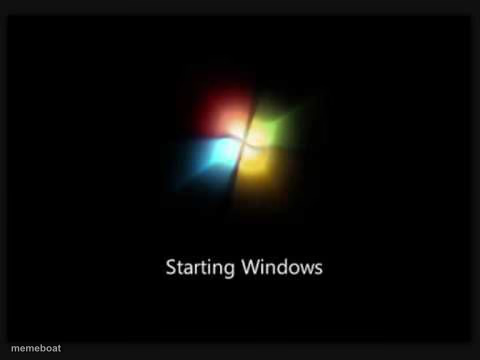
The nostalgic Windows 7 'Starting Windows' boot screen — for every joke about slow computers, loading, or 2010s nostalgia. Free to caption.
Blank Starting Windows meme template
Download the blank Starting Windows template to caption it yourself, or add your text right here in the editor above and download the finished meme.
When to use the Starting Windows meme
- Waiting for literally anything slow to load or start
- Nostalgia posts about 2010s computer labs and dial-up
- Describing your brain 'booting up' before coffee
- Any joke about outdated tech that refuses to die
Starting Windows template facts
- Featuring
- Windows 7 Boot Screen (Microsoft Windows 7)
- Dimensions
- 480 × 360 px
- Format
- PNG
- Text boxes
- 1
- Added
- 2025
About the Starting Windows meme template
The Windows 7 Startup meme template draws inspiration from the iconic boot screen of the Windows 7 operating system, a nostalgic symbol for millions of users worldwide. This meme taps into internet culture by blending tech nostalgia with humor, making it a viral phenomenon on social media platforms since its rise in popularity around 2015. As a staple in meme culture, the Windows 7 Startup meme resonates with audiences familiar with the frustrations and quirks of older software, creating relatable and entertaining content that thrives in online communities.
Knowing how to use the Windows 7 Startup meme template effectively can elevate your social media content and engage your audience with funny reactions and relatable moments. Perfect for tech enthusiasts, gamers, or anyone reminiscing about the early 2010s digital era, this meme works best when paired with witty captions about delays, anticipation, or unexpected outcomes. Whether you're wondering how to make a Windows 7 Startup meme or when to post it, this template suits posts on Instagram, Twitter, Facebook, or TikTok that highlight everyday frustrations or humorous tech experiences.
The Windows 7 Startup meme remains popular due to its instant recognizability and versatility for customization. With our easy-to-use meme maker, you can create, customize, and generate your own Windows 7 Startup memes in seconds—no design skills needed. This online generator offers instant results, making meme creation quick and fun while maximizing viral potential across social media. Don’t wait—start building your own hilarious, shareable content now and join millions who have made this template a trending favorite in meme culture.
Popular Starting Windows caption ideas
Starting Monday...
My brain at 6am
Loading my will to adult
Templates similar to Starting Windows



Starting Windows meme FAQ
How do I make a Starting Windows meme?
Scroll up to the Starting Windows template, type your caption into the text box in the editor above, adjust the font, size and color if you like, then click download. Your finished Starting Windows meme is ready to share in seconds.
Can I use the Starting Windows template for free?
Yes. The Starting Windows template is completely free to use — no signup and no limits on how many memes you create or where you share them.
How do I download my Starting Windows meme?
Click the download button under the editor once your Starting Windows meme looks right. It saves straight to your device as a high-quality PNG or JPEG image.
How do I download the blank Starting Windows template?
Use the "Download blank template" button in the blank Starting Windows template section above to save the original, un-captioned image — handy if you'd rather caption it in another app or keep a copy.