
Windows Me Wallpaper Meme Generator
Create Your Windows Me Wallpaper Meme
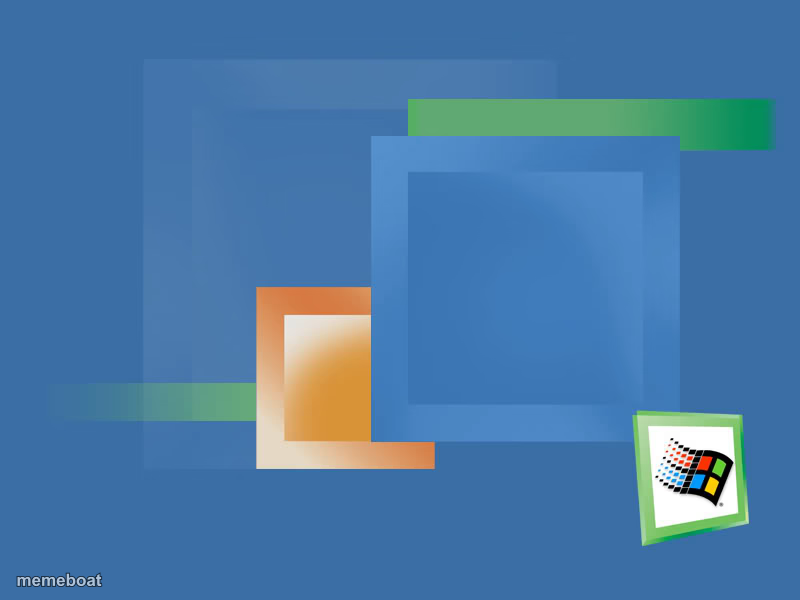
The classic Windows Millennium Edition default desktop wallpaper with its logo in the corner. Great for early-2000s nostalgia jokes. Free to caption and download.
Blank Windows Me Wallpaper meme template
Download the blank Windows Me Wallpaper template to caption it yourself, or add your text right here in the editor above and download the finished meme.
When to use the Windows Me Wallpaper meme
- Nostalgia jokes about early-2000s computers that crashed every five minutes
- Captioning random childhood memories over a familiar old desktop
- Jokes about how unstable Windows ME famously was
Windows Me Wallpaper template facts
- Featuring
- Windows Millennium Edition (Windows ME)
- Dimensions
- 800 × 600 px
- Format
- JPG
- Text boxes
- 3
- Added
- 2025
About the Windows Me Wallpaper meme template
That instantly recognizable blue-toned abstract wallpaper with overlapping squares and the little Windows ME box logo tucked in the corner. If you grew up with a beige tower PC, this one hits straight in the nostalgia gland.
Use it for jokes about old computers crashing constantly, early internet memories, or just captioning nonsense over a screen you stared at for way too long as a kid.
Popular Windows Me Wallpaper caption ideas
Me explaining why the computer needs to restart · again · for the third time today
This wallpaper · has seen more crashes · than a demolition derby
POV: it's 2001 · and the dial-up is connecting · for the next 45 minutes
Templates similar to Windows Me Wallpaper


Windows Me Wallpaper meme FAQ
How do I make a Windows Me Wallpaper meme?
Scroll up to the Windows Me Wallpaper template, type your caption into the 3 text boxes in the editor above, adjust the font, size and color if you like, then click download. Your finished Windows Me Wallpaper meme is ready to share in seconds.
Can I use the Windows Me Wallpaper template for free?
Yes. The Windows Me Wallpaper template is completely free to use — no signup and no limits on how many memes you create or where you share them.
How do I download my Windows Me Wallpaper meme?
Click the download button under the editor once your Windows Me Wallpaper meme looks right. It saves straight to your device as a high-quality PNG or JPEG image.
How do I download the blank Windows Me Wallpaper template?
Use the "Download blank template" button in the blank Windows Me Wallpaper template section above to save the original, un-captioned image — handy if you'd rather caption it in another app or keep a copy.