
veryd ded Meme Generator
A tiny blocky character says 'am ded' on a road as a giant golden mechanical claw looms overhead. Caption it and download free.
Create Your veryd ded Meme
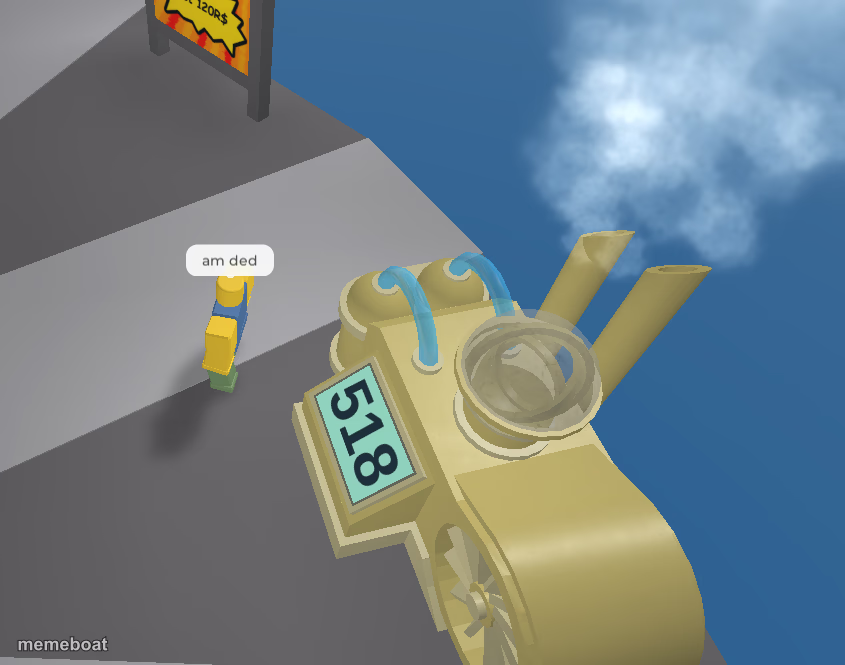
Blank veryd ded meme template
Download the blank veryd ded template to caption it yourself, or add your text right here in the editor above and download the finished meme.
When to use the veryd ded meme
- When you see the deadline coming and there's nothing you can do about it
- Reacting to a notification that your flight got cancelled
- That feeling right before your boss calls you into a meeting
veryd ded template facts
- Dimensions
- 845 × 665 px
- Format
- PNG
- Text boxes
- 2
- Added
- 2025
About the veryd ded meme template
Some days you're the giant golden machine rolling through, and some days you're the tiny guy standing in the road going 'am ded.' This low-poly disaster-in-progress captures that exact split second before something huge and metallic ruins someone's whole day.
Perfect for any time you or someone you know is about to get absolutely flattened by circumstances way bigger than them — deadlines, debt, a boss's mood, whatever's coming down the road. Swap the caption, keep the dread.
Popular veryd ded caption ideas
me · watching the deadline roll in
my savings account · seeing the car repair estimate
also me · after hitting 'reply all' by mistake
veryd ded meme FAQ
How do I make a veryd ded meme?
Scroll up to the veryd ded template, type your caption into the 2 text boxes in the editor above, adjust the font, size and color if you like, then click download. Your finished veryd ded meme is ready to share in seconds.
Can I use the veryd ded template for free?
Yes. The veryd ded template is completely free to use — no signup and no limits on how many memes you create or where you share them.
How do I download my veryd ded meme?
Click the download button under the editor once your veryd ded meme looks right. It saves straight to your device as a high-quality PNG or JPEG image.
How do I download the blank veryd ded template?
Use the "Download blank template" button in the blank veryd ded template section above to save the original, un-captioned image — handy if you'd rather caption it in another app or keep a copy.