
lol is you ded Meme Generator
Create Your lol is you ded Meme
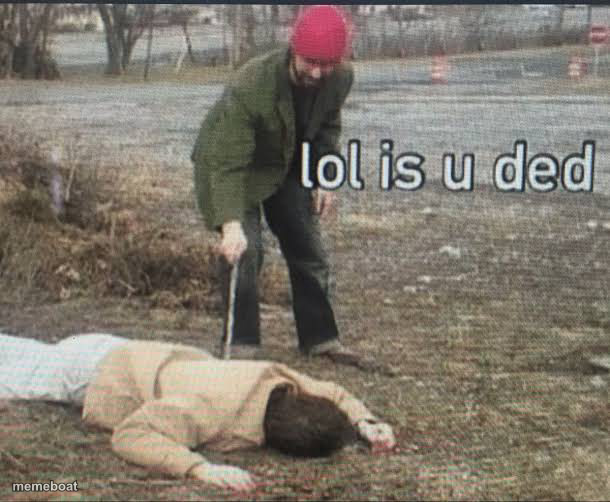
A guy in a red beanie pokes a person lying face-down on the ground with a stick, checking if they're dead. Caption it and download free.
Blank lol is you ded meme template
Download the blank lol is you ded template to caption it yourself, or add your text right here in the editor above and download the finished meme.
When to use the lol is you ded meme
- Checking on your friend after they overdid it at the party
- Waking up your sibling who's been asleep way too long
- Poking your motivation to see if it still exists
- Reacting to someone who just face-planted
lol is you ded template facts
- Dimensions
- 610 × 502 px
- Format
- JPG
- Added
- 2025
About the lol is you ded meme template
A man in a red beanie casually pokes a person sprawled face-down in a field with a stick, like he's just checking if they need a nudge or a 911 call. Deadpan, slightly unsettling, extremely relatable.
Use this for poking fun at someone who's clearly not okay, checking on a friend who overdid it last night, or any situation where you're cautiously assessing whether something (or someone) is still alive. Dark comedy energy without actually being dark.
Templates similar to lol is you ded


lol is you ded meme FAQ
How do I make a lol is you ded meme?
Scroll up to the lol is you ded template, add your own text boxes in the editor above and type your captions, adjust the font, size and color if you like, then click download. Your finished lol is you ded meme is ready to share in seconds.
Can I use the lol is you ded template for free?
Yes. The lol is you ded template is completely free to use — no signup and no limits on how many memes you create or where you share them.
How do I download my lol is you ded meme?
Click the download button under the editor once your lol is you ded meme looks right. It saves straight to your device as a high-quality PNG or JPEG image.
How do I download the blank lol is you ded template?
Use the "Download blank template" button in the blank lol is you ded template section above to save the original, un-captioned image — handy if you'd rather caption it in another app or keep a copy.