
iPhone Home Screen Meme Generator
Create Your iPhone Home Screen Meme
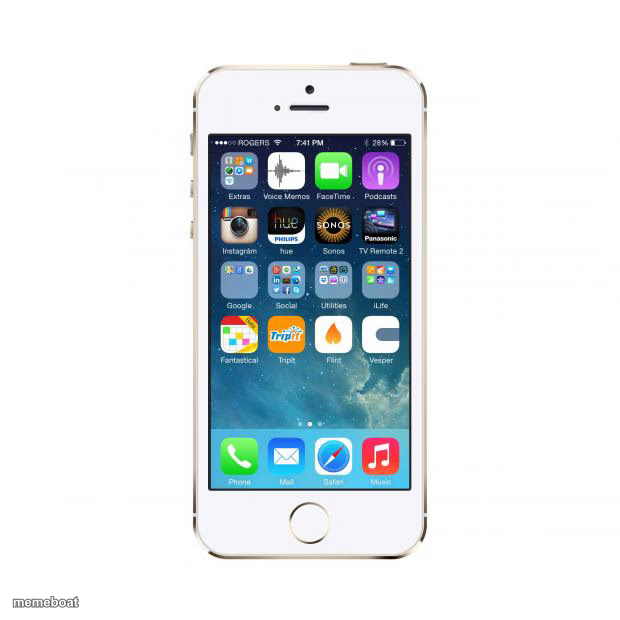
A classic iPhone 5s home screen packed with random apps and folders. Great for phone-addiction jokes and app-organization roasts. Free to caption and download.
Blank iPhone Home Screen meme template
Download the blank iPhone Home Screen template to caption it yourself, or add your text right here in the editor above and download the finished meme.
When to use the iPhone Home Screen meme
- Roasting someone's cluttered, unorganized app layout
- Joking about apps you downloaded once and forgot about
- The 28% battery panic before you've even left the house
- Staring at your phone trying to decide what to do with your life
iPhone Home Screen template facts
- Dimensions
- 620 × 620 px
- Format
- JPG
- Added
- 2025
About the iPhone Home Screen meme template
It's just a phone screen — but not just any phone screen. It's the digital equivalent of a junk drawer, folders labeled 'Social' and 'Utilities' doing absolutely nothing to hide the chaos underneath. This is the home screen of someone who downloads an app once, uses it twice, and never deletes it.
Great template for jokes about hoarding apps you never open, phone battery anxiety (28% and no charger in sight), or just captioning the vibe of staring at your screen deciding what app to open instead of doing anything productive.
Popular iPhone Home Screen caption ideas
I THINK MY PHONE IS BROKEN · I PRESS THE HOME BUTTON AND I'M STILL AT WORK
Templates similar to iPhone Home Screen
iPhone Home Screen meme FAQ
How do I make a iPhone Home Screen meme?
Scroll up to the iPhone Home Screen template, add your own text boxes in the editor above and type your captions, adjust the font, size and color if you like, then click download. Your finished iPhone Home Screen meme is ready to share in seconds.
Can I use the iPhone Home Screen template for free?
Yes. The iPhone Home Screen template is completely free to use — no signup and no limits on how many memes you create or where you share them.
How do I download my iPhone Home Screen meme?
Click the download button under the editor once your iPhone Home Screen meme looks right. It saves straight to your device as a high-quality PNG or JPEG image.
How do I download the blank iPhone Home Screen template?
Use the "Download blank template" button in the blank iPhone Home Screen template section above to save the original, un-captioned image — handy if you'd rather caption it in another app or keep a copy.