
iPhone Notification Meme Generator
Create Your iPhone Notification Meme
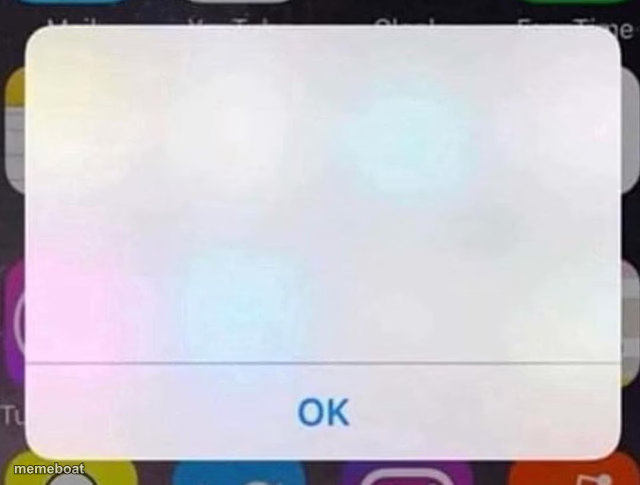
An empty iPhone alert popup with just an 'OK' button — the ultimate blank-slate template for fake notification jokes. Free to caption and download.
Blank iPhone Notification meme template
Download the blank iPhone Notification template to caption it yourself, or add your text right here in the editor above and download the finished meme.
When to use the iPhone Notification meme
- Writing a fake system notification that calls someone out by name
- Making up the most unhinged possible phone alert
- Parodying real iOS warnings with something way more personal
iPhone Notification template facts
- Dimensions
- 640 × 485 px
- Format
- JPG
- Text boxes
- 2
- Added
- 2025
About the iPhone Notification meme template
A totally blank iPhone alert box hovering over a blurred home screen, with nothing but an 'OK' button waiting to be pressed. The message field is wide open, which means you get to decide exactly what horrifying, hilarious, or oddly specific notification just hit your phone.
Popular iPhone Notification caption ideas
Notification: your ex just got engaged · OK
Alert: you have 47 unread texts and none from him · OK
Reminder: that thing you said 6 years ago was weird · OK
Templates similar to iPhone Notification

iPhone Notification meme FAQ
How do I make a iPhone Notification meme?
Scroll up to the iPhone Notification template, type your caption into the 2 text boxes in the editor above, adjust the font, size and color if you like, then click download. Your finished iPhone Notification meme is ready to share in seconds.
Can I use the iPhone Notification template for free?
Yes. The iPhone Notification template is completely free to use — no signup and no limits on how many memes you create or where you share them.
How do I download my iPhone Notification meme?
Click the download button under the editor once your iPhone Notification meme looks right. It saves straight to your device as a high-quality PNG or JPEG image.
How do I download the blank iPhone Notification template?
Use the "Download blank template" button in the blank iPhone Notification template section above to save the original, un-captioned image — handy if you'd rather caption it in another app or keep a copy.