
Gummie's Announcement Template Meme Generator
Create Your Gummie's Announcement Template Meme

A blue water-dragon creature announces something in a speech bubble while a red block guy and a deer wait below. Caption it and download free.
Blank Gummie's Announcement Template meme template
Download the blank Gummie's Announcement Template template to caption it yourself, or add your text right here in the editor above and download the finished meme.
When to use the Gummie's Announcement Template meme
- Announcing a Discord server rule change nobody is going to read
- Parodying a corporate press release with an unhinged personal update
- Reacting to random news while your friends just stare blankly like the deer
Gummie's Announcement Template template facts
- Dimensions
- 1009 × 632 px
- Format
- PNG
- Text boxes
- 2
- Added
- 2026
About the Gummie's Announcement Template meme template
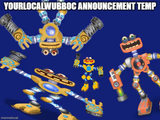
A cartoon water-dragon opens its mouth to make a big announcement, while off to the side a blocky red guy and a wide-eyed antlered creature sit around a "What I'm listening to" label like they're about to overshare their Spotify Wrapped. It's the perfect setup for anything that starts with "Announcement:" and then goes completely off the rails.
Use the top bubble for the fake-official statement and the bottom label for the punchline nobody asked for. Great for gaming Discords, fan communities, or just yelling into the void about your day. Type your text, hit download, and go post it — free, no sign-up.
Popular Gummie's Announcement Template caption ideas
HAPPY NEW YEAR EVERYONE! MAY 2026 BE A GREAT YEAR FOR YOU ALL! JUBYPHONIC - HAPPY HALLOWEEN (IDFC IF IT'S TOO EARLY THIS SONG IS A BOP)
Announcement: I am once again asking · for nobody to be normal about this
Announcement: server maintenance · is just me refusing to log off
Announcement: new policy incoming · no one voted on this but here we are
Templates similar to Gummie's Announcement Template


Gummie's Announcement Template meme FAQ
How do I make a Gummie's Announcement Template meme?
Scroll up to the Gummie's Announcement Template template, type your caption into the 2 text boxes in the editor above, adjust the font, size and color if you like, then click download. Your finished Gummie's Announcement Template meme is ready to share in seconds.
Can I use the Gummie's Announcement Template template for free?
Yes. The Gummie's Announcement Template template is completely free to use — no signup and no limits on how many memes you create or where you share them.
How do I download my Gummie's Announcement Template meme?
Click the download button under the editor once your Gummie's Announcement Template meme looks right. It saves straight to your device as a high-quality PNG or JPEG image.
How do I download the blank Gummie's Announcement Template template?
Use the "Download blank template" button in the blank Gummie's Announcement Template template section above to save the original, un-captioned image — handy if you'd rather caption it in another app or keep a copy.