
SpongeBob Announcement Meme Generator
Create Your SpongeBob Announcement Meme
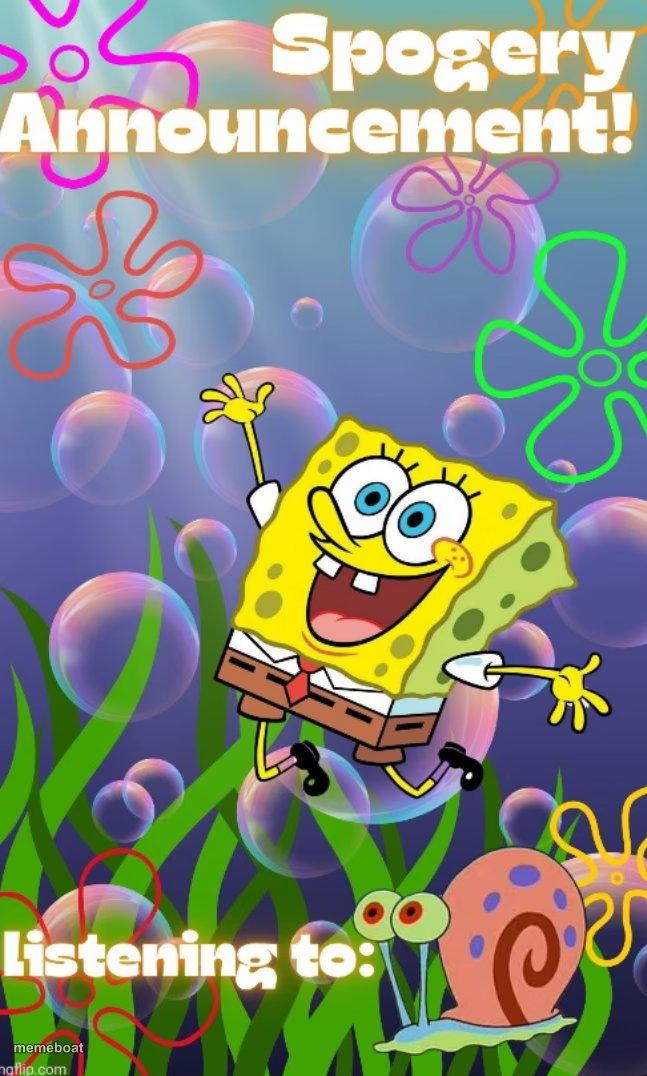
SpongeBob jumping joyfully underwater with an 'Announcement!' banner and a 'listening to' line for Gary — perfect for hype posts. Free to caption and download.
Blank SpongeBob Announcement meme template
Download the blank SpongeBob Announcement template to caption it yourself, or add your text right here in the editor above and download the finished meme.
When to use the SpongeBob Announcement meme
- Hyping up small news like it's a huge reveal
- Fake podcast or playlist announcement post
- Group chat update delivered with way too much enthusiasm
- Announcing something mundane like a big life event
SpongeBob Announcement template facts
- Featuring
- SpongeBob SquarePants
- Dimensions
- 647 × 1076 px
- Format
- PNG
- Text boxes
- 2
- Added
- 2025
About the SpongeBob Announcement meme template
The Spogebob_Memes announcement meme, crafted by disco, has quickly become a standout template in internet culture and meme communities. Emerging as a viral phenomenon on platforms like Twitter and TikTok, this meme captures the essence of humorous announcements with a unique twist. Since its rise in popularity, it has been embraced widely for its relatable and comedic appeal, making it a staple in social media meme culture. Its distinct style and recognizable format make it perfect for expressing funny reactions and delivering punchy messages that resonate across digital audiences.
Using the Spogebob_Memes announcement meme template is simple and effective for a variety of social media content. Whether you’re looking to create funny reactions, share relatable moments, or craft entertaining announcements, this meme maker is perfect for your needs. Knowing how to use this template effectively can boost engagement on Instagram, Facebook, Twitter, and TikTok. It’s ideal for posting during trending events or casual conversations, allowing users to connect through humor and shared experiences. If you’re wondering how to make a Spogebob_Memes announcement meme or when to post it, this template offers endless creative possibilities to keep your content fresh and viral.
The popularity of the Spogebob_Memes announcement meme remains strong due to its versatility and ease of creation. With our online generator, you can instantly create, customize, and personalize your own memes without any design skills. This meme template is designed for quick, viral content creation that drives social media engagement and shares. Millions of users trust this meme maker for producing funny, trending memes that spread rapidly across platforms. Start generating your Spogebob_Memes announcement memes now and join the wave of viral meme creators sharing laughter worldwide.
Popular SpongeBob Announcement caption ideas
ANNOUNCEMENT! · I refilled the water bottle
ANNOUNCEMENT! · listening to: my own thoughts spiral at 2am
ANNOUNCEMENT! · listening to: the same 3 songs for the 400th time
Templates similar to SpongeBob Announcement




SpongeBob Announcement meme FAQ
How do I make a SpongeBob Announcement meme?
Scroll up to the SpongeBob Announcement template, type your caption into the 2 text boxes in the editor above, adjust the font, size and color if you like, then click download. Your finished SpongeBob Announcement meme is ready to share in seconds.
Can I use the SpongeBob Announcement template for free?
Yes. The SpongeBob Announcement template is completely free to use — no signup and no limits on how many memes you create or where you share them.
How do I download my SpongeBob Announcement meme?
Click the download button under the editor once your SpongeBob Announcement meme looks right. It saves straight to your device as a high-quality PNG or JPEG image.
How do I download the blank SpongeBob Announcement template?
Use the "Download blank template" button in the blank SpongeBob Announcement template section above to save the original, un-captioned image — handy if you'd rather caption it in another app or keep a copy.