
Wubbox Announcement Meme Generator
Create Your Wubbox Announcement Meme
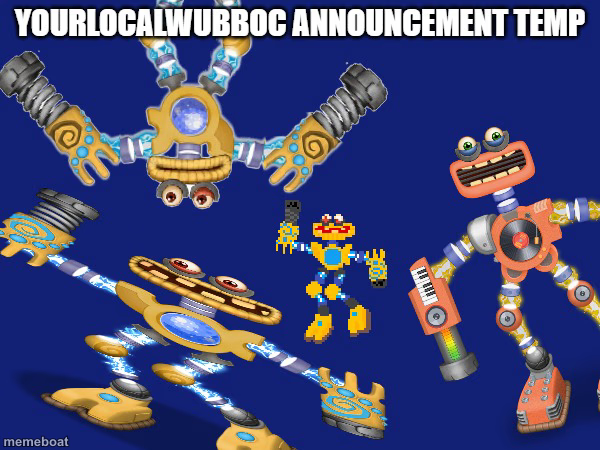
Golden and orange Wubbox-style robot monsters lined up for a big reveal. Caption your next announcement, update, or hype post and download free.
Blank Wubbox Announcement meme template
Download the blank Wubbox Announcement template to caption it yourself, or add your text right here in the editor above and download the finished meme.
When to use the Wubbox Announcement meme
- Captioning a big group chat announcement that's actually about nothing important
- Reacting to a friend group finally scheduling a hangout after months of flaking
- Hyping up a minor personal win like it's breaking news
- Announcing server downtime or a game update in a Discord community
Wubbox Announcement template facts
- Dimensions
- 600 × 450 px
- Format
- JPG
- Text boxes
- 2
- Added
- 2025
About the Wubbox Announcement meme template
Three chunky robot monsters straight out of the Wubbox family from My Singing Monsters, posed on a deep blue backdrop like they're about to drop huge news. That gold one with the spring-loaded arms alone looks like it could headline a keynote.
Use this one whenever you need a big, official-feeling announcement energy but the news itself is anything but serious. Server maintenance, group chat drama, or a friend finally texting back after three weeks — this lineup makes it feel like a full press conference.
Popular Wubbox Announcement caption ideas
BREAKING NEWS · the group chat has a new admin
ATTENTION EVERYONE · someone finally paid Venmo back
OFFICIAL STATEMENT · we are NOT doing a group project again
Templates similar to Wubbox Announcement





Wubbox Announcement meme FAQ
How do I make a Wubbox Announcement meme?
Scroll up to the Wubbox Announcement template, type your caption into the 2 text boxes in the editor above, adjust the font, size and color if you like, then click download. Your finished Wubbox Announcement meme is ready to share in seconds.
Can I use the Wubbox Announcement template for free?
Yes. The Wubbox Announcement template is completely free to use — no signup and no limits on how many memes you create or where you share them.
How do I download my Wubbox Announcement meme?
Click the download button under the editor once your Wubbox Announcement meme looks right. It saves straight to your device as a high-quality PNG or JPEG image.
How do I download the blank Wubbox Announcement template?
Use the "Download blank template" button in the blank Wubbox Announcement template section above to save the original, un-captioned image — handy if you'd rather caption it in another app or keep a copy.