
You Can't Go Back Error Meme Generator
Create Your You Can't Go Back Error Meme
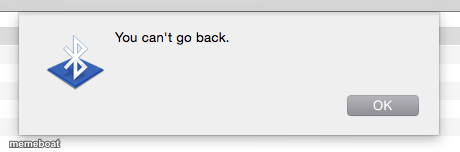
A fake Mac OS error popup that just says 'You can't go back.' Perfect for no-turning-back moments and irreversible decisions. Caption and download free.
Blank You Can't Go Back Error meme template
Download the blank You Can't Go Back Error template to caption it yourself, or add your text right here in the editor above and download the finished meme.
When to use the You Can't Go Back Error meme
- The moment right after you send a text you can't unsend
- Realizing you already hit 'submit' on the application
- Deleting the ex's contact and immediately remembering their birthday
- Committing to the group chat's terrible plan out loud
You Can't Go Back Error template facts
- Featuring
- Bluetooth Error Dialog (Mac OS)
- Dimensions
- 460 × 152 px
- Format
- PNG
- Text boxes
- 2
- Added
- 2025
About the You Can't Go Back Error meme template
It's the most ominous system dialog ever shipped: a plain gray Mac popup with a Bluetooth icon, one button, and a message that reads less like a tech error and more like a warning from the universe. There's no cancel option. There's just OK, because you don't get a choice anymore.
Use it for the exact second regret sets in — right after you hit send, quit the job, or eat the last slice you promised your roommate. It's the deadpan, computerized voice of consequences, and it hits harder because it looks so mundane.
Popular You Can't Go Back Error caption ideas
Me after replying to the group chat with 'I'm down for anything' · That includes karaoke, apparently
Hitting send on the email at 2am · System: you can't go back.
Agreeing to be the designated driver · Forever
Templates similar to You Can't Go Back Error

You Can't Go Back Error meme FAQ
How do I make a You Can't Go Back Error meme?
Scroll up to the You Can't Go Back Error template, type your caption into the 2 text boxes in the editor above, adjust the font, size and color if you like, then click download. Your finished You Can't Go Back Error meme is ready to share in seconds.
Can I use the You Can't Go Back Error template for free?
Yes. The You Can't Go Back Error template is completely free to use — no signup and no limits on how many memes you create or where you share them.
How do I download my You Can't Go Back Error meme?
Click the download button under the editor once your You Can't Go Back Error meme looks right. It saves straight to your device as a high-quality PNG or JPEG image.
How do I download the blank You Can't Go Back Error template?
Use the "Download blank template" button in the blank You Can't Go Back Error template section above to save the original, un-captioned image — handy if you'd rather caption it in another app or keep a copy.