
Yeet the child Meme Generator
Create Your Yeet the child Meme

Also known as: Cartoon Character Throwing Child
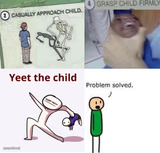
Four-panel comic ending with a stick figure swinging a small child by the leg labeled 'Yeet the child,' great for exaggerated overreactions to bad news. Caption and download free.
Blank Yeet the child meme template
Download the blank Yeet the child template to caption it yourself, or add your text right here in the editor above and download the finished meme.
When to use the Yeet the child meme
- dramatic overcorrection
- exaggerated panic response
Yeet the child template facts
- Dimensions
- 1280 × 1280 px
- Format
- PNG
- Text boxes
- 2
- Added
- 2025
About the Yeet the child meme template
A four-panel comic of a stick-figure adult and child. The adult says "Hey bro! Look at what I wrote!" over a blank page, then a grey face gives a flat look before the last panel, with the text "Yeet the child", shows the adult flinging the child away. Used to react to a small problem with an extreme, overblown response.
Popular Yeet the child caption ideas
When someone touches · your last fry
Sees a spider · on the ceiling
When the group chat · goes silent
Haha i created mobile game ads oh are gonna cry haha · YOU...





Yeet the child meme FAQ
How do I make a Yeet the child meme?
Scroll up to the Yeet the child template, type your caption into the 2 text boxes in the editor above, adjust the font, size and color if you like, then click download. Your finished Yeet the child meme is ready to share in seconds.
Can I use the Yeet the child template for free?
Yes. The Yeet the child template is completely free to use — no signup and no limits on how many memes you create or where you share them.
How do I download my Yeet the child meme?
Click the download button under the editor once your Yeet the child meme looks right. It saves straight to your device as a high-quality PNG or JPEG image.
How do I download the blank Yeet the child template?
Use the "Download blank template" button in the blank Yeet the child template section above to save the original, un-captioned image — handy if you'd rather caption it in another app or keep a copy.