
Windows Question Dialog Meme Generator
Create Your Windows Question Dialog Meme
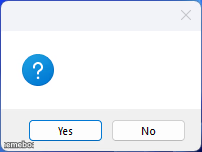
A blank Windows-style question dialog with Yes and No buttons, perfect for parodying pointless computer prompts. Add your own question and download free.
Blank Windows Question Dialog meme template
Download the blank Windows Question Dialog template to caption it yourself, or add your text right here in the editor above and download the finished meme.
When to use the Windows Question Dialog meme
- Parodying pointless computer confirmation popups
- Framing a real-life decision as a fake system prompt
- Mocking software that asks 'are you sure?' way too many times
Windows Question Dialog template facts
- Dimensions
- 202 × 152 px
- Format
- PNG
- Text boxes
- 2
- Added
- 2025
About the Windows Question Dialog meme template
That classic little blue question-mark popup Windows loves throwing at you for absolutely no reason, with just two buttons: Yes or No, no explanation given. It's the visual shorthand for every confusing, unnecessary confirmation prompt you've ever clicked through without reading.
Drop in any ridiculous or oddly specific question and let the fake system UI do the joke for you. Great for poking fun at overly cautious software, decision paralysis, or just presenting your own life choices as a dumb computer dialog box.
Popular Windows Question Dialog caption ideas
Windows 11 · This system has been on for 1 month. Would you like to log off and touch grass?
Are you sure you want to text him back? · Yes / No
Delete 3am thoughts permanently? · Yes / No
Continue procrastinating? · Yes / No
Templates similar to Windows Question Dialog

Windows Question Dialog meme FAQ
How do I make a Windows Question Dialog meme?
Scroll up to the Windows Question Dialog template, type your caption into the 2 text boxes in the editor above, adjust the font, size and color if you like, then click download. Your finished Windows Question Dialog meme is ready to share in seconds.
Can I use the Windows Question Dialog template for free?
Yes. The Windows Question Dialog template is completely free to use — no signup and no limits on how many memes you create or where you share them.
How do I download my Windows Question Dialog meme?
Click the download button under the editor once your Windows Question Dialog meme looks right. It saves straight to your device as a high-quality PNG or JPEG image.
How do I download the blank Windows Question Dialog template?
Use the "Download blank template" button in the blank Windows Question Dialog template section above to save the original, un-captioned image — handy if you'd rather caption it in another app or keep a copy.