
Casket Into Trash Meme Generator
Create Your Casket Into Trash Meme
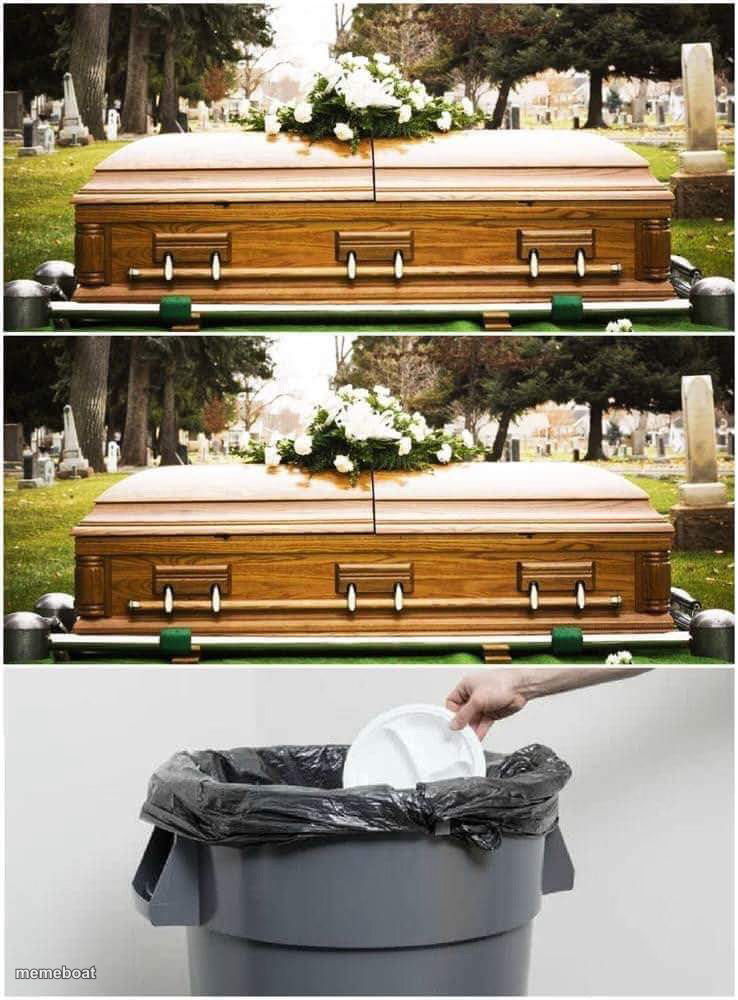
Two caskets at a graveside then someone tossing trash in a bin — the ultimate 'this doesn't matter, toss it' meme. Add captions and download free.
Blank Casket Into Trash meme template
Download the blank Casket Into Trash template to caption it yourself, or add your text right here in the editor above and download the finished meme.
When to use the Casket Into Trash meme
- Burying a bad idea before it even gets a chance
- Reacting to unsolicited advice you didn't ask for
- Ending a toxic relationship without ceremony
- Retiring a New Year's resolution by day 3
Casket Into Trash template facts
- Dimensions
- 738 × 1000 px
- Format
- JPG
- Added
- 2025
About the Casket Into Trash meme template
Two solemn shots of a flower-topped casket at the cemetery, then cut to a hand casually chucking garbage into a bin. It's the visual shorthand for 'that's dead to me' or 'straight in the bin' — funeral gravity undercut by pure disposal energy.
Use it whenever something should have mattered but absolutely does not: a relationship, a New Year's resolution, someone's opinion. The deadpan repetition of the casket shot builds the fake-solemn setup before the trash-can punchline lands.
Templates similar to Casket Into Trash





Casket Into Trash meme FAQ
How do I make a Casket Into Trash meme?
Scroll up to the Casket Into Trash template, add your own text boxes in the editor above and type your captions, adjust the font, size and color if you like, then click download. Your finished Casket Into Trash meme is ready to share in seconds.
Can I use the Casket Into Trash template for free?
Yes. The Casket Into Trash template is completely free to use — no signup and no limits on how many memes you create or where you share them.
How do I download my Casket Into Trash meme?
Click the download button under the editor once your Casket Into Trash meme looks right. It saves straight to your device as a high-quality PNG or JPEG image.
How do I download the blank Casket Into Trash template?
Use the "Download blank template" button in the blank Casket Into Trash template section above to save the original, un-captioned image — handy if you'd rather caption it in another app or keep a copy.