
Rose Casket Meme Generator
Create Your Rose Casket Meme
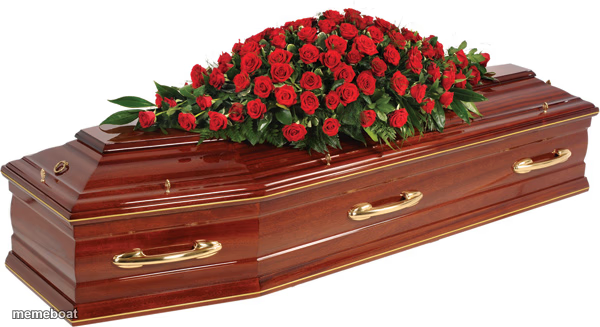
A polished wooden casket covered in a blanket of red roses — the darkly funny 'this is how it ends' template. Caption it and download free.
Blank Rose Casket meme template
Download the blank Rose Casket template to caption it yourself, or add your text right here in the editor above and download the finished meme.
When to use the Rose Casket meme
- Captioning the death of your diet after one bite of cake
- When your phone battery hits 1% with no charger in sight
- The moment you hit reply-all by accident
- Your motivation on a Monday morning
Rose Casket template facts
- Dimensions
- 600 × 327 px
- Format
- JPG
- Text boxes
- 2
- Added
- 2025
About the Rose Casket meme template
A gleaming mahogany casket draped in a massive spray of red roses, the kind of image that shows up when things have gone irreversibly, dramatically wrong. It's funeral-adjacent, over-the-top solemn, and perfect for humor that leans into 'well, that's the end of that.'
Popular Rose Casket caption ideas
I'D DO ANYTHING TO SKIP SCHOOL . . . FAMOUS LAST WORDS: · ANYTHING!
Here lies my diet · killed by one slice of cake
My savings account · after one Amazon order
My weekend · the moment Sunday night hits
Templates similar to Rose Casket




Rose Casket meme FAQ
How do I make a Rose Casket meme?
Scroll up to the Rose Casket template, type your caption into the 2 text boxes in the editor above, adjust the font, size and color if you like, then click download. Your finished Rose Casket meme is ready to share in seconds.
Can I use the Rose Casket template for free?
Yes. The Rose Casket template is completely free to use — no signup and no limits on how many memes you create or where you share them.
How do I download my Rose Casket meme?
Click the download button under the editor once your Rose Casket meme looks right. It saves straight to your device as a high-quality PNG or JPEG image.
How do I download the blank Rose Casket template?
Use the "Download blank template" button in the blank Rose Casket template section above to save the original, un-captioned image — handy if you'd rather caption it in another app or keep a copy.