
Tek Meme Generator
Create Your Tek Meme
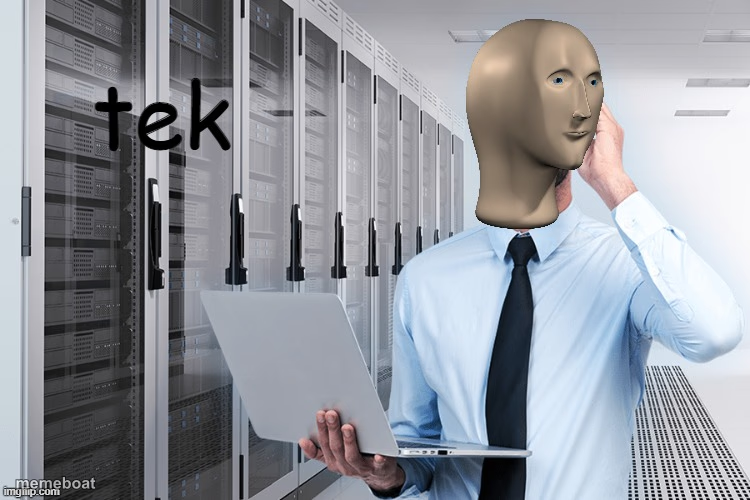
Meme Man in a suit holding a laptop in a server room, labeled 'tek' — the go-to template for mocking tech bros and IT jargon. Caption it free.
Blank Tek meme template
Download the blank Tek template to caption it yourself, or add your text right here in the editor above and download the finished meme.
When to use the Tek meme
- Explaining that your startup 'uses AI' when it's really just if-statements
- The IT guy who says 'have you tried turning it off and on again'
- Buzzword bingo in a tech meeting
- Someone larping as a hacker after watching one YouTube video
Tek template facts
- Featuring
- Meme Man (Meme Man series)
- Dimensions
- 750 × 500 px
- Format
- PNG
- Added
- 2025
About the Tek meme template
Meme Man, humanity's blankest and most deadpan mascot, shows up in a business suit holding a laptop in front of a server rack, with "tek" scrawled next to him like a corporate buzzword that lost its meaning halfway through.
This one's built for anything tech-adjacent that's more vibes than substance — startup jargon, "we use AI" claims that are just if-statements, or your uncle explaining blockchain at Thanksgiving. Deadpan energy required.
Popular Tek caption ideas
ME WHEN I SET UP THE WII U WITHOUT · MY DAD'S HELP
Templates similar to Tek



Tek meme FAQ
How do I make a Tek meme?
Scroll up to the Tek template, add your own text boxes in the editor above and type your captions, adjust the font, size and color if you like, then click download. Your finished Tek meme is ready to share in seconds.
Can I use the Tek template for free?
Yes. The Tek template is completely free to use — no signup and no limits on how many memes you create or where you share them.
How do I download my Tek meme?
Click the download button under the editor once your Tek meme looks right. It saves straight to your device as a high-quality PNG or JPEG image.
How do I download the blank Tek template?
Use the "Download blank template" button in the blank Tek template section above to save the original, un-captioned image — handy if you'd rather caption it in another app or keep a copy.