
Sigma Male Meme Generator
Create Your Sigma Male Meme
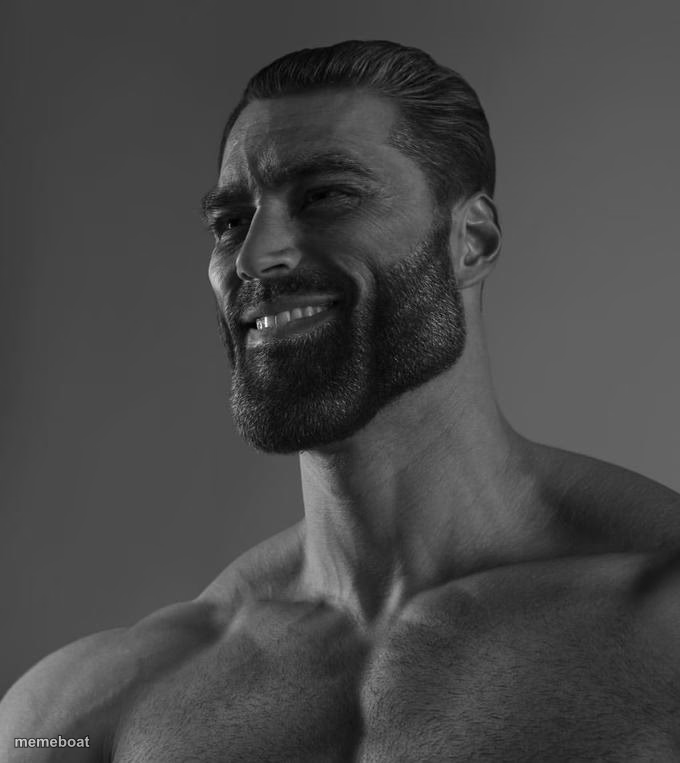
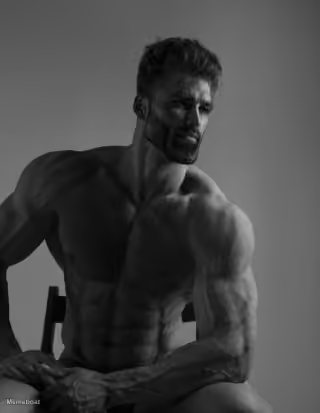
The iconic black-and-white chiseled Gigachad, smiling with total confidence. Use it for peak 'alpha' flex jokes. Caption and download free.
Blank Sigma Male meme template
Download the blank Sigma Male template to caption it yourself, or add your text right here in the editor above and download the finished meme.
When to use the Sigma Male meme
- When you do the bare minimum and somehow still get praised
- Reacting to your own petty win with way too much confidence
- That friend who parallel parks perfectly on the first try
Sigma Male template facts
- Featuring
- Gigachad (Gigachad meme)
- Dimensions
- 680 × 763 px
- Format
- JPG
- Text boxes
- 1
- Added
- 2025
About the Sigma Male meme template
The internet's ultimate chad — black-and-white, jaw for days, smirking like he's never once had an awkward moment in his life. This is the reference photo behind a thousand 'gigachad' jokes about absurd, unbothered confidence.
Popular Sigma Male caption ideas
UPVOTE IT AGAINST VAPES · IGNORE IF YOU’RE A ZOOPHILE
ME AFTER REPLYING 'K' AND MEANING IT
WHEN YOU RETURN THE SHOPPING CART TO THE EXACT CORRAL
HIM: FINISHES TASK IN ONE TRY. ALSO HIM: DOESN'T MENTION IT
HOW MFS FEEL AFTER MAKING EIGHT MEMES YAPPING BOUT SUM “ I MADE EIGHT MEMES THAT GOT TO THE FRONT PAGE “
Templates similar to Sigma Male


Sigma Male meme FAQ
How do I make a Sigma Male meme?
Scroll up to the Sigma Male template, type your caption into the text box in the editor above, adjust the font, size and color if you like, then click download. Your finished Sigma Male meme is ready to share in seconds.
Can I use the Sigma Male template for free?
Yes. The Sigma Male template is completely free to use — no signup and no limits on how many memes you create or where you share them.
How do I download my Sigma Male meme?
Click the download button under the editor once your Sigma Male meme looks right. It saves straight to your device as a high-quality PNG or JPEG image.
How do I download the blank Sigma Male template?
Use the "Download blank template" button in the blank Sigma Male template section above to save the original, un-captioned image — handy if you'd rather caption it in another app or keep a copy.