
Gigachad Two Panel Meme Generator
Create Your Gigachad Two Panel Meme
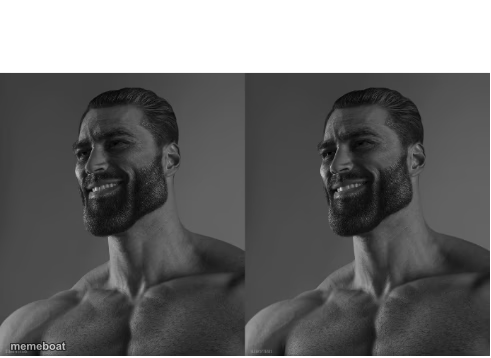
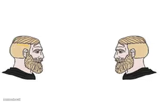
Two-panel Gigachad smirk meme with the chiseled bearded jawline. Perfect for flexing an unbeatable take. Caption it free, no login.
Blank Gigachad Two Panel meme template
Download the blank Gigachad Two Panel template to caption it yourself, or add your text right here in the editor above and download the finished meme.
When to use the Gigachad Two Panel meme
- Someone states a wildly confident hot take like it's fact
- Reacting to your own unhinged 3am decision that somehow worked out
- Flexing on people who doubted a simple life choice
- Responding to 'are you sure about that?' with total certainty
Gigachad Two Panel template facts
- Featuring
- Gigachad (Gigachad meme (based on photo of Ernest Khalimov))
- Dimensions
- 491 × 358 px
- Format
- PNG
- Text boxes
- 2
- Added
- 2025
About the Gigachad Two Panel meme template
You know this jaw. This is Gigachad, the internet's platonic ideal of a jacked, bearded, smugly-smirking alpha, rendered here in two near-identical grayscale panels like he's about to drop the most confident opinion of your feed.
Use it whenever someone states an objectively correct, unbothered fact, or when you want to caption a smug flex with zero self-doubt. Two text boxes means two beats of the joke, top and bottom, so build the setup and let the smirk deliver the punchline.
Popular Gigachad Two Panel caption ideas
Avarage ImgFlip enjoyer: · Average Mematic fan:
me deciding to skip leg day · me doing legs anyway because why not
"you can't microwave cereal" · watch me
told her I don't get nervous · narrator: he was extremely nervous
Templates similar to Gigachad Two Panel



Gigachad Two Panel meme FAQ
How do I make a Gigachad Two Panel meme?
Scroll up to the Gigachad Two Panel template, type your caption into the 2 text boxes in the editor above, adjust the font, size and color if you like, then click download. Your finished Gigachad Two Panel meme is ready to share in seconds.
Can I use the Gigachad Two Panel template for free?
Yes. The Gigachad Two Panel template is completely free to use — no signup and no limits on how many memes you create or where you share them.
How do I download my Gigachad Two Panel meme?
Click the download button under the editor once your Gigachad Two Panel meme looks right. It saves straight to your device as a high-quality PNG or JPEG image.
How do I download the blank Gigachad Two Panel template?
Use the "Download blank template" button in the blank Gigachad Two Panel template section above to save the original, un-captioned image — handy if you'd rather caption it in another app or keep a copy.