
Russian general looking at laptop with magnifying glass Meme Generator
Create Your Russian general looking at laptop with magnifying glass Meme
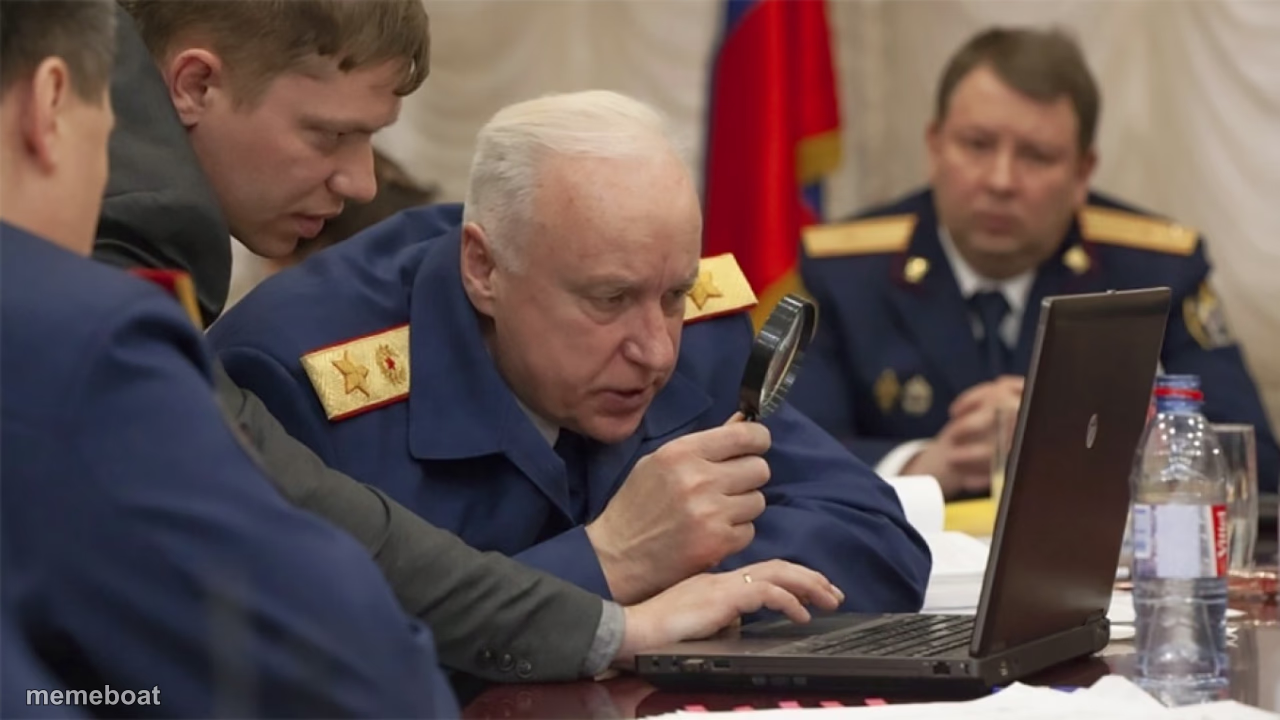
An older uniformed official squints through a magnifying glass at a laptop screen. Perfect for over-scrutinizing something trivial. Caption free.
Blank Russian general looking at laptop with magnifying glass meme template
Download the blank Russian general looking at laptop with magnifying glass template to caption it yourself, or add your text right here in the editor above and download the finished meme.
When to use the Russian general looking at laptop with magnifying glass meme
- Zooming in on a blurry photo to find who actually broke the vase
- Reading the terms and conditions like it's evidence in a trial
- Fact-checking a group chat rumor with maximum seriousness
- Investigating why the wifi is slow like it's a federal case
Russian general looking at laptop with magnifying glass template facts
- Dimensions
- 1280 × 720 px
- Format
- JPG
- Text boxes
- 2
- Added
- 2025
About the Russian general looking at laptop with magnifying glass meme template
Picture the most extra way to check your email: bring in a decorated official in full military dress, hand him a magnifying glass, and have him lean in like the laptop owes him money. That's this template — a senior officer surrounded by aides, squinting at a screen like it holds state secrets instead of a Word document with three typos.
Use it anytime someone is investigating something way harder than it deserves — auditing a group chat, fact-checking a meme, or reading the fine print on a coupon like it's a confession. Add your own caption, download free, no sign-up.
Popular Russian general looking at laptop with magnifying glass caption ideas
WHEN SHE SAYS "READ THE LAST TEXT CAREFULLY" · ME ANALYZING EVERY PIXEL FOR HIDDEN MEANING
INVESTIGATING WHY MY WIFI DROPPED FOR 2 SECONDS · TREATING IT LIKE A NATIONAL SECURITY BREACH
FACT-CHECKING A MEME BEFORE SHARING IT · BECAUSE MY REPUTATION IS ON THE LINE
Templates similar to Russian general looking at laptop with magnifying glass


Russian general looking at laptop with magnifying glass meme FAQ
How do I make a Russian general looking at laptop with magnifying glass meme?
Scroll up to the Russian general looking at laptop with magnifying glass template, type your caption into the 2 text boxes in the editor above, adjust the font, size and color if you like, then click download. Your finished Russian general looking at laptop with magnifying glass meme is ready to share in seconds.
Can I use the Russian general looking at laptop with magnifying glass template for free?
Yes. The Russian general looking at laptop with magnifying glass template is completely free to use — no signup and no limits on how many memes you create or where you share them.
How do I download my Russian general looking at laptop with magnifying glass meme?
Click the download button under the editor once your Russian general looking at laptop with magnifying glass meme looks right. It saves straight to your device as a high-quality PNG or JPEG image.
How do I download the blank Russian general looking at laptop with magnifying glass template?
Use the "Download blank template" button in the blank Russian general looking at laptop with magnifying glass template section above to save the original, un-captioned image — handy if you'd rather caption it in another app or keep a copy.