
Premium Announcement Meme Generator
Create Your Premium Announcement Meme
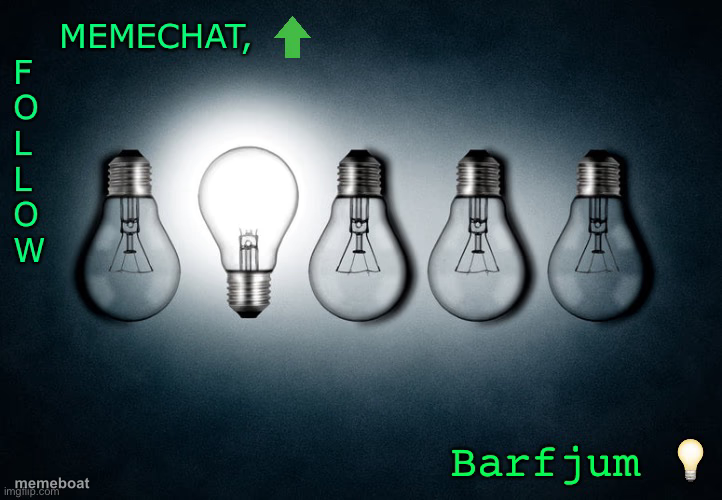
One glowing lightbulb stands out among a row of dark ones — the classic 'good idea' or 'be different' visual. Free to caption and download.
Blank Premium Announcement meme template
Download the blank Premium Announcement template to caption it yourself, or add your text right here in the editor above and download the finished meme.
When to use the Premium Announcement meme
- Being the one person with a good idea in a meeting full of blank stares
- Finally understanding the assignment after everyone else already gave up
- Standing out from the crowd in any group setting
- That one moment of clarity in a sea of confusion
Premium Announcement template facts
- Dimensions
- 722 × 500 px
- Format
- JPG
- Text boxes
- 1
- Added
- 2025
About the Premium Announcement meme template
Four dim lightbulbs in a row, one lit up bright in the middle. It's the universal shorthand for having the one good idea nobody else thought of, or just being the one person in the group chat who actually shows up.
Use it for anything about standing out, having a lightbulb moment, or being the exception to the rule.
Popular Premium Announcement caption ideas
ENGLAND: HUMOUR AMERICA: HUMOR ENGLAND: FAVOURITE AMERICA: FAVORITE ENGLAND: WHY ARE YOU DOING THAT? AMERICA: WE’RE TRYING TO GET RID OF U!
me at 2am actually doing the work everyone else gave up on
that one coworker with the actually good idea
the friend group's only functioning brain cell
Templates similar to Premium Announcement


Premium Announcement meme FAQ
How do I make a Premium Announcement meme?
Scroll up to the Premium Announcement template, type your caption into the text box in the editor above, adjust the font, size and color if you like, then click download. Your finished Premium Announcement meme is ready to share in seconds.
Can I use the Premium Announcement template for free?
Yes. The Premium Announcement template is completely free to use — no signup and no limits on how many memes you create or where you share them.
How do I download my Premium Announcement meme?
Click the download button under the editor once your Premium Announcement meme looks right. It saves straight to your device as a high-quality PNG or JPEG image.
How do I download the blank Premium Announcement template?
Use the "Download blank template" button in the blank Premium Announcement template section above to save the original, un-captioned image — handy if you'd rather caption it in another app or keep a copy.