
mayakovsky announcement Meme Generator
Create Your mayakovsky announcement Meme
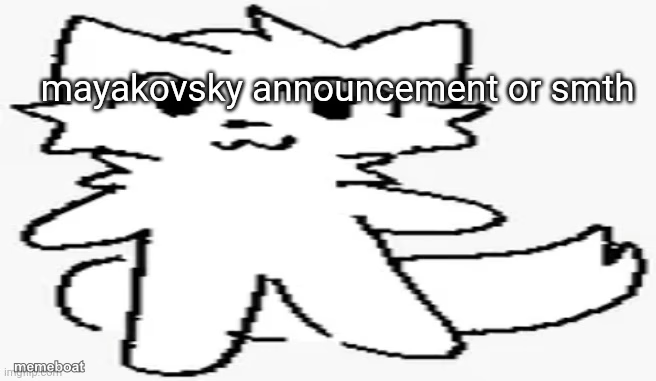
A minimalist white cat doodle template, perfect for calm announcements or deadpan one-liners. Caption it your way and download free.
Blank mayakovsky announcement meme template
Download the blank mayakovsky announcement template to caption it yourself, or add your text right here in the editor above and download the finished meme.
When to use the mayakovsky announcement meme
- Delivering an announcement nobody asked for
- Understated reactions to chaos
- Any calm, matter-of-fact statement
mayakovsky announcement template facts
- Dimensions
- 656 × 381 px
- Format
- JPG
- Text boxes
- 1
- Added
- 2025
About the mayakovsky announcement meme template
It's just a simple outlined cat doodle with a little smile, standing there like it's about to drop some very important news in the most understated way possible. The blank-slate style is exactly why it works for anything.
Popular mayakovsky announcement caption ideas
mayakovsky announcement
green
just here to remind you rent is due tomorrow
me, casually ruining everyone's mood
breaking news: nothing happened today
Templates similar to mayakovsky announcement


mayakovsky announcement meme FAQ
How do I make a mayakovsky announcement meme?
Scroll up to the mayakovsky announcement template, type your caption into the text box in the editor above, adjust the font, size and color if you like, then click download. Your finished mayakovsky announcement meme is ready to share in seconds.
Can I use the mayakovsky announcement template for free?
Yes. The mayakovsky announcement template is completely free to use — no signup and no limits on how many memes you create or where you share them.
How do I download my mayakovsky announcement meme?
Click the download button under the editor once your mayakovsky announcement meme looks right. It saves straight to your device as a high-quality PNG or JPEG image.
How do I download the blank mayakovsky announcement template?
Use the "Download blank template" button in the blank mayakovsky announcement template section above to save the original, un-captioned image — handy if you'd rather caption it in another app or keep a copy.