
Curious Jack Russell Meme Generator
Create Your Curious Jack Russell Meme
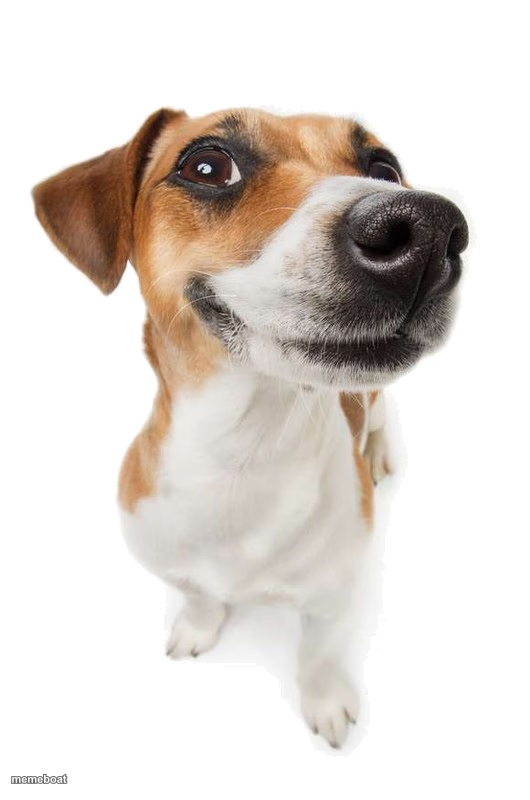
A Jack Russell terrier tilting its head with a big curious nose right in the camera — perfect for confused or nosy reaction memes. Caption it free.
Blank Curious Jack Russell meme template
Download the blank Curious Jack Russell template to caption it yourself, or add your text right here in the editor above and download the finished meme.
When to use the Curious Jack Russell meme
- When someone whispers and the dog immediately investigates
- Reacting to the sound of a treat bag from three rooms away
- You, overhearing your name in a conversation
Curious Jack Russell template facts
- Dimensions
- 530 × 800 px
- Format
- PNG
- Added
- 2025
About the Curious Jack Russell meme template
This little guy is leaning in with his whole face like he just heard something he wasn't supposed to. That nose-forward, one-eyebrow-up look is basically the universal dog expression for "wait, what?"
Use it for anything that requires suspicious curiosity — nosy relatives, dogs eavesdropping on the word 'walk,' or you reading a text message three times trying to figure out what it means.
Templates similar to Curious Jack Russell




Curious Jack Russell meme FAQ
How do I make a Curious Jack Russell meme?
Scroll up to the Curious Jack Russell template, add your own text boxes in the editor above and type your captions, adjust the font, size and color if you like, then click download. Your finished Curious Jack Russell meme is ready to share in seconds.
Can I use the Curious Jack Russell template for free?
Yes. The Curious Jack Russell template is completely free to use — no signup and no limits on how many memes you create or where you share them.
How do I download my Curious Jack Russell meme?
Click the download button under the editor once your Curious Jack Russell meme looks right. It saves straight to your device as a high-quality PNG or JPEG image.
How do I download the blank Curious Jack Russell template?
Use the "Download blank template" button in the blank Curious Jack Russell template section above to save the original, un-captioned image — handy if you'd rather caption it in another app or keep a copy.