
jack black Meme Generator
Create Your jack black Meme
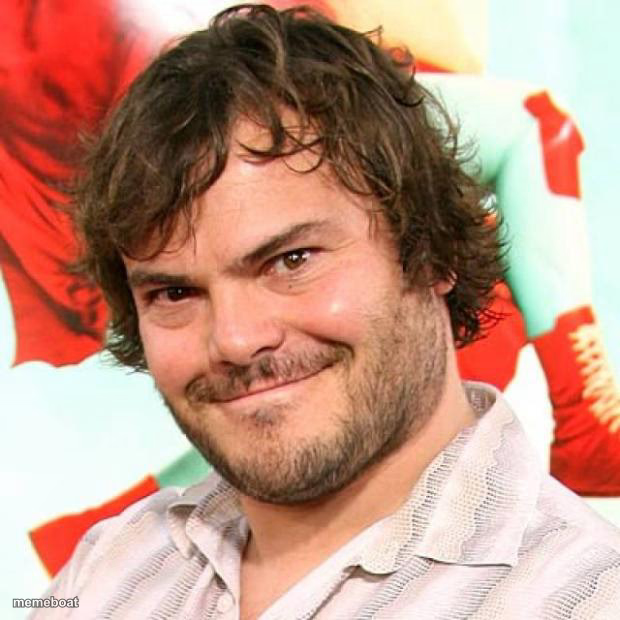
Jack Black gives his signature knowing smirk-smile — perfect for cocky confidence, playful sarcasm, or "I told you so" energy. Caption it free.
Blank jack black meme template
Download the blank jack black template to caption it yourself, or add your text right here in the editor above and download the finished meme.
When to use the jack black meme
- The face you make right before dropping a chaotic idea
- Flexing on someone in a lighthearted way
- That confident grin before a terrible plan
jack black template facts
- Featuring
- Jack Black (Public Figure)
- Dimensions
- 620 × 620 px
- Format
- JPG
- Text boxes
- 2
- Added
- 2025
About the jack black meme template
Jack Black doing what Jack Black does best: a close-up smirk that's half charm, half chaos, like he's about to say something ridiculous and fully commit to it. It's the face of a man who knows he's right and is enjoying every second of it.
Popular jack black caption ideas
tells you he's "just gonna have one beer" · 3 hours later, doing karaoke on the table
me explaining why my terrible decision was actually genius · everyone else, unconvinced
when someone asks if you're okay · absolutely not but thanks for asking



jack black meme FAQ
How do I make a jack black meme?
Scroll up to the jack black template, type your caption into the 2 text boxes in the editor above, adjust the font, size and color if you like, then click download. Your finished jack black meme is ready to share in seconds.
Can I use the jack black template for free?
Yes. The jack black template is completely free to use — no signup and no limits on how many memes you create or where you share them.
How do I download my jack black meme?
Click the download button under the editor once your jack black meme looks right. It saves straight to your device as a high-quality PNG or JPEG image.
How do I download the blank jack black template?
Use the "Download blank template" button in the blank jack black template section above to save the original, un-captioned image — handy if you'd rather caption it in another app or keep a copy.