
Ink And Error Poke Meme Generator
Create Your Ink And Error Poke Meme
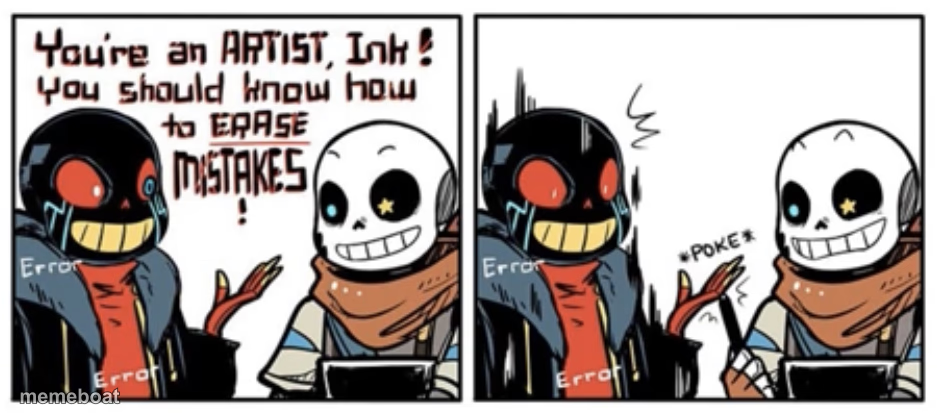
Two skeleton characters debate erasing mistakes, then one just pokes the other's face instead. Caption your own petty comeback and download free.
Blank Ink And Error Poke meme template
Download the blank Ink And Error Poke template to caption it yourself, or add your text right here in the editor above and download the finished meme.
When to use the Ink And Error Poke meme
- Someone lectures you on how to fix your own mistake, so you just poke them
- Someone acting like an expert on something you clearly know how to do yourself
Ink And Error Poke template facts
- Dimensions
- 937 × 413 px
- Format
- JPG
- Text boxes
- 2
- Added
- 2025
About the Ink And Error Poke meme template
A smug lecture about being an artist who should know how to erase mistakes gets shut down the only way that matters: a single, deeply unbothered finger poke. It's the two-panel format built for any time someone gives unsolicited advice and gets an equally unbothered non-response back.
Whether you know these two as Undertale AU skeletons or not, the setup translates instantly — pompous statement, then someone just does the smallest possible dismissive thing instead of arguing. Perfect for shutting down backseat critics, unsolicited "well actually"s, or anyone lecturing you on how to fix your own work.
Popular Ink And Error Poke caption ideas
SANITY · ME
you should really proofread your texts before sending them · *poke*
I could fix this bug in five minutes if you just let me · *poke*
you know as a chef I would never season it like that · *poke*
Templates similar to Ink And Error Poke




Ink And Error Poke meme FAQ
How do I make a Ink And Error Poke meme?
Scroll up to the Ink And Error Poke template, type your caption into the 2 text boxes in the editor above, adjust the font, size and color if you like, then click download. Your finished Ink And Error Poke meme is ready to share in seconds.
Can I use the Ink And Error Poke template for free?
Yes. The Ink And Error Poke template is completely free to use — no signup and no limits on how many memes you create or where you share them.
How do I download my Ink And Error Poke meme?
Click the download button under the editor once your Ink And Error Poke meme looks right. It saves straight to your device as a high-quality PNG or JPEG image.
How do I download the blank Ink And Error Poke template?
Use the "Download blank template" button in the blank Ink And Error Poke template section above to save the original, un-captioned image — handy if you'd rather caption it in another app or keep a copy.