
Sans No Sans Meme Generator
Create Your Sans No Sans Meme
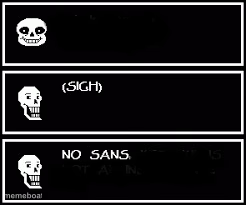
Sans grins, sighs, then flatly says 'NO SANS' across three black panels — perfect for shutting down a bad take in stages. Caption it free.
Blank Sans No Sans meme template
Download the blank Sans No Sans template to caption it yourself, or add your text right here in the editor above and download the finished meme.
When to use the Sans No Sans meme
- Someone asking you to work overtime
- A friend pitching a bad weekend plan
- Getting asked to split the bill evenly
- Being invited to help someone move
Sans No Sans template facts
- Featuring
- Sans (Undertale)
- Dimensions
- 246 × 205 px
- Format
- JPG
- Text boxes
- 2
- Added
- 2025
About the Sans No Sans meme template
Three deadpan panels: Sans smiling, Sans sighing, then Sans flat-out refusing. It's the Undertale skeleton doing the internet's favorite move — a slow build to a hard no.
Use it whenever someone asks you to do the thing, and you need to walk them through denial in three acts. Works for chores, group projects, terrible pitches, anything that deserves a theatrical rejection.
Popular Sans No Sans caption ideas
can you cover my shift · NO
let's split the Uber evenly · absolutely not
one more episode? · we both know that's a lie
Templates similar to Sans No Sans

Sans No Sans meme FAQ
How do I make a Sans No Sans meme?
Scroll up to the Sans No Sans template, type your caption into the 2 text boxes in the editor above, adjust the font, size and color if you like, then click download. Your finished Sans No Sans meme is ready to share in seconds.
Can I use the Sans No Sans template for free?
Yes. The Sans No Sans template is completely free to use — no signup and no limits on how many memes you create or where you share them.
How do I download my Sans No Sans meme?
Click the download button under the editor once your Sans No Sans meme looks right. It saves straight to your device as a high-quality PNG or JPEG image.
How do I download the blank Sans No Sans template?
Use the "Download blank template" button in the blank Sans No Sans template section above to save the original, un-captioned image — handy if you'd rather caption it in another app or keep a copy.