
Sans Back It Up Meme Generator
Create Your Sans Back It Up Meme
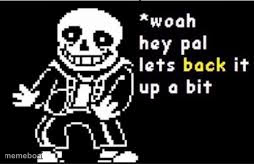
Sans from Undertale tells you to back it up a bit with his signature deadpan warning. Perfect for calling out overstepping or oversharing — free to caption.
Blank Sans Back It Up meme template
Download the blank Sans Back It Up template to caption it yourself, or add your text right here in the editor above and download the finished meme.
When to use the Sans Back It Up meme
- Someone you just met asks an invasive personal question
- A coworker starts giving unsolicited life advice
- Your friend starts a sentence with 'no offense but'
- Someone gets way too comfortable way too fast
Sans Back It Up template facts
- Featuring
- Sans (Undertale)
- Dimensions
- 254 × 164 px
- Format
- PNG
- Added
- 2025
About the Sans Back It Up meme template
Sans, doing what Sans does best: delivering a deadpan warning with maximum menace and minimum effort. "Woah hey pal, let's back it up a bit" is the internet's go-to line for someone getting way too comfortable, way too fast.
Use it whenever someone overshares, overreaches, or says something that needs an immediate hard stop. Works on friends, strangers, that one coworker, or yourself mid-bad-decision.
Templates similar to Sans Back It Up


Sans Back It Up meme FAQ
How do I make a Sans Back It Up meme?
Scroll up to the Sans Back It Up template, add your own text boxes in the editor above and type your captions, adjust the font, size and color if you like, then click download. Your finished Sans Back It Up meme is ready to share in seconds.
Can I use the Sans Back It Up template for free?
Yes. The Sans Back It Up template is completely free to use — no signup and no limits on how many memes you create or where you share them.
How do I download my Sans Back It Up meme?
Click the download button under the editor once your Sans Back It Up meme looks right. It saves straight to your device as a high-quality PNG or JPEG image.
How do I download the blank Sans Back It Up template?
Use the "Download blank template" button in the blank Sans Back It Up template section above to save the original, un-captioned image — handy if you'd rather caption it in another app or keep a copy.