Cooked Books Meme Generator
Create Your Cooked Books Meme
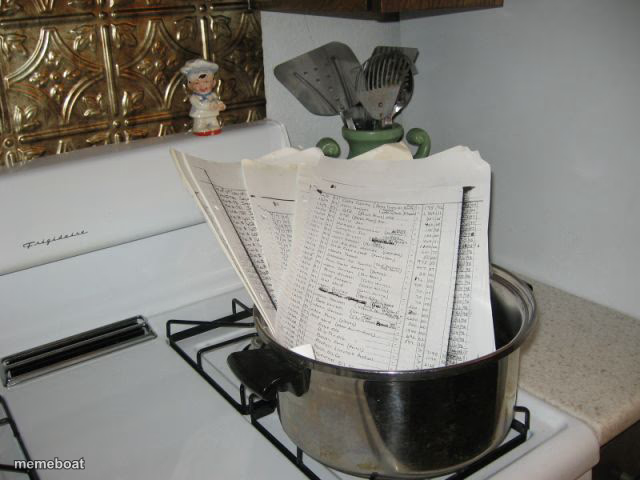
Literal 'cooking the books' meme: a pile of ledger papers stuffed in a pot on the stove. Perfect for fraud, sketchy accounting, or shady deals. Free to caption.
Blank Cooked Books meme template
Download the blank Cooked Books template to caption it yourself, or add your text right here in the editor above and download the finished meme.
When to use the Cooked Books meme
- When your friend explains their crypto losses with very creative math
- A company's quarterly earnings report that doesn't match reality
- Anyone doing their taxes in a way that's 'technically not illegal'
Cooked Books template facts
- Dimensions
- 640 × 480 px
- Format
- JPG
- Text boxes
- 1
- Added
- 2025
About the Cooked Books meme template
Somebody took the phrase 'cooking the books' way too literally and shoved a stack of accounting ledgers straight into a pot on the stove. It's dumb, it's perfect, and it works every single time someone's numbers don't add up.
Popular Cooked Books caption ideas
I SEE YOU LEARNED HOW TO COOK · WHILE WORKING FOR ENRON
the accountant, probably
how the company stayed profitable for 8 straight years
me explaining where my paycheck went
Templates similar to Cooked Books





Cooked Books meme FAQ
How do I make a Cooked Books meme?
Scroll up to the Cooked Books template, type your caption into the text box in the editor above, adjust the font, size and color if you like, then click download. Your finished Cooked Books meme is ready to share in seconds.
Can I use the Cooked Books template for free?
Yes. The Cooked Books template is completely free to use — no signup and no limits on how many memes you create or where you share them.
How do I download my Cooked Books meme?
Click the download button under the editor once your Cooked Books meme looks right. It saves straight to your device as a high-quality PNG or JPEG image.
How do I download the blank Cooked Books template?
Use the "Download blank template" button in the blank Cooked Books template section above to save the original, un-captioned image — handy if you'd rather caption it in another app or keep a copy.