
i'm cooked Meme Generator
Create Your i'm cooked Meme
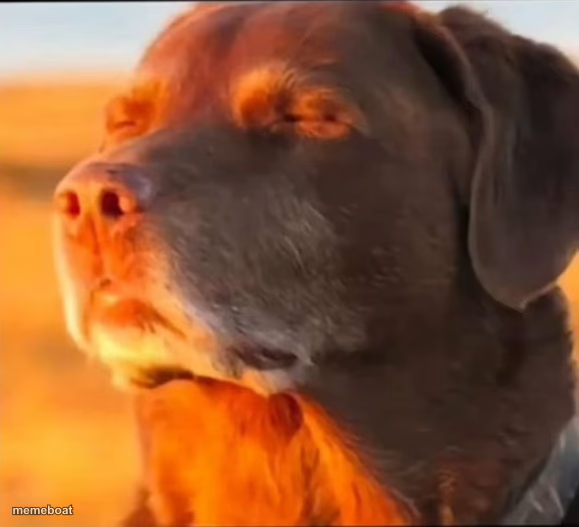
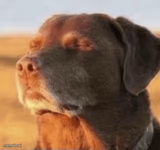
A dog closes its eyes in golden sunset light, soaking in peaceful bliss. Perfect for pure contentment or savoring a small win. Caption free & download.
Blank i'm cooked meme template
Download the blank i'm cooked template to caption it yourself, or add your text right here in the editor above and download the finished meme.
When to use the i'm cooked meme
- When you finally close your laptop on a Friday
- That feeling after finishing a huge deadline
- Ignoring your responsibilities on purpose
i'm cooked template facts
- Dimensions
- 579 × 527 px
- Format
- JPG
- Text boxes
- 2
- Added
- 2025
About the i'm cooked meme template
Eyes closed, snout tilted up, catching the last warm light of the day — this dog has found peace and isn't giving it back. There's no drama here, no chaos, just a big contented sigh baked into golden hour glow.
Use it for that rare moment when everything's fine, actually — when you finally sat down, when the stress lifted, when someone else is dealing with the problem for once. It's the visual equivalent of exhaling.
Popular i'm cooked caption ideas
me after muting the group chat · for the rest of the week
not my problem anymore · logging off like
when the meeting gets cancelled · instant zen
Templates similar to i'm cooked



i'm cooked meme FAQ
How do I make a i'm cooked meme?
Scroll up to the i'm cooked template, type your caption into the 2 text boxes in the editor above, adjust the font, size and color if you like, then click download. Your finished i'm cooked meme is ready to share in seconds.
Can I use the i'm cooked template for free?
Yes. The i'm cooked template is completely free to use — no signup and no limits on how many memes you create or where you share them.
How do I download my i'm cooked meme?
Click the download button under the editor once your i'm cooked meme looks right. It saves straight to your device as a high-quality PNG or JPEG image.
How do I download the blank i'm cooked template?
Use the "Download blank template" button in the blank i'm cooked template section above to save the original, un-captioned image — handy if you'd rather caption it in another app or keep a copy.