
Zala Meme Generator
Create Your Zala Meme
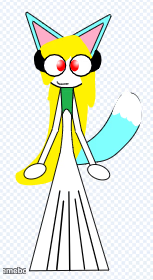
A cute yellow-and-white cartoon fox-girl character with headphones and a white dress. Simple, expressive template for reaction captions. Free to caption and download.
Blank Zala meme template
Download the blank Zala template to caption it yourself, or add your text right here in the editor above and download the finished meme.
When to use the Zala meme
- Reacting to a mildly annoying but harmless inconvenience
- When someone gives unsolicited advice you didn't ask for
- Waiting for a reply that's taking forever
- Pretending you're fine when you're clearly not
Zala template facts
- Dimensions
- 153 × 280 px
- Format
- PNG
- Text boxes
- 2
- Added
- 2025
About the Zala meme template
A yellow cartoon fox-girl with big red eyes, headphones, and a flowing white dress, standing there looking mildly done with everything. Simple lines, easy to read, plenty of blank space for a punchline.
Good for soft, slightly sassy reactions — the kind of face you make when something is mildly annoying but not worth a whole meltdown over.
Popular Zala caption ideas
When someone gives advice you didn't ask for · 'thanks I guess'
Me pretending I'm okay · me at 3am replaying the whole conversation
Waiting for a text back · for the 4th hour straight
Templates similar to Zala



Zala meme FAQ
How do I make a Zala meme?
Scroll up to the Zala template, type your caption into the 2 text boxes in the editor above, adjust the font, size and color if you like, then click download. Your finished Zala meme is ready to share in seconds.
Can I use the Zala template for free?
Yes. The Zala template is completely free to use — no signup and no limits on how many memes you create or where you share them.
How do I download my Zala meme?
Click the download button under the editor once your Zala meme looks right. It saves straight to your device as a high-quality PNG or JPEG image.
How do I download the blank Zala template?
Use the "Download blank template" button in the blank Zala template section above to save the original, un-captioned image — handy if you'd rather caption it in another app or keep a copy.