
Yuta Meme Generator
Create Your Yuta Meme

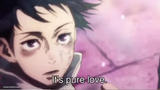
Manga-style close-up of a sharp-eyed character glaring sideways past a shadowy structure. Perfect for side-eye reactions. Caption it free.
Blank Yuta meme template
Download the blank Yuta template to caption it yourself, or add your text right here in the editor above and download the finished meme.
When to use the Yuta meme
- reacting to someone's obviously bad plan
- the exact face you make when a group project teammate disappears
- watching a plot twist you called from episode one
- side-eyeing a friend who just said 'trust me'
Yuta template facts
- Dimensions
- 736 × 736 px
- Format
- JPG
- Text boxes
- 2
- Added
- 2025
About the Yuta meme template
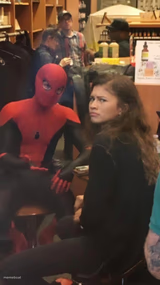
That razor-focused sideways glare, half a face cut across the panel, jaw set and eyes narrowed like something's about to go very wrong. It's the manga stare you use when words won't cut it and a single unimpressed look has to carry the whole joke.
Whether you're calling out a friend's terrible decision or reacting to a plot twist nobody saw coming, this template does the heavy lifting. Drop your caption on and let the glare finish the sentence.
Popular Yuta caption ideas
me finding out it's a group project · and I'm the only one who read the assignment
when someone says 'it's just a prank bro' · after breaking your phone
that face when the plot twist · was obvious since episode 1


Yuta meme FAQ
How do I make a Yuta meme?
Scroll up to the Yuta template, type your caption into the 2 text boxes in the editor above, adjust the font, size and color if you like, then click download. Your finished Yuta meme is ready to share in seconds.
Can I use the Yuta template for free?
Yes. The Yuta template is completely free to use — no signup and no limits on how many memes you create or where you share them.
How do I download my Yuta meme?
Click the download button under the editor once your Yuta meme looks right. It saves straight to your device as a high-quality PNG or JPEG image.
How do I download the blank Yuta template?
Use the "Download blank template" button in the blank Yuta template section above to save the original, un-captioned image — handy if you'd rather caption it in another app or keep a copy.