
Side-Eyeing Chloe Meme Generator
Create Your Side-Eyeing Chloe Meme
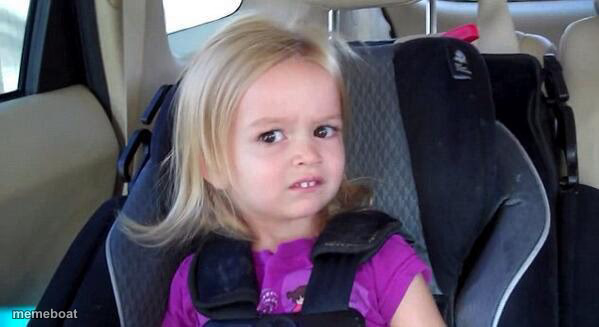
Also known as: Side-Eye Chloe
A little girl in a car seat gives the most skeptical, unimpressed side-eye ever caught on camera. Ideal for suspicion and disbelief. Free to caption and share.
Blank Side-Eyeing Chloe meme template
Download the blank Side-Eyeing Chloe template to caption it yourself, or add your text right here in the editor above and download the finished meme.
When to use the Side-Eyeing Chloe meme
- Side-eyeing a friend's terrible life choice
- When someone says "trust me" right before disaster
- Catching a sibling in an obvious lie
Side-Eyeing Chloe template facts
- Featuring
- Chloe (viral video (Bad Day Chloe))
- Dimensions
- 599 × 327 px
- Format
- JPG
- Added
- 2025
About the Side-Eyeing Chloe meme template
This is Chloe — the toddler whose deadpan, are-you-serious-right-now side-eye from a car seat became one of the internet's most reliable reaction faces. She's not buying whatever you're selling, and her face says it before she does.
Use her for suspicious glances, calling out an obvious lie, or reacting to a plan that's clearly a bad idea.
Templates similar to Side-Eyeing Chloe


Side-Eyeing Chloe meme FAQ
How do I make a Side-Eyeing Chloe meme?
Scroll up to the Side-Eyeing Chloe template, add your own text boxes in the editor above and type your captions, adjust the font, size and color if you like, then click download. Your finished Side-Eyeing Chloe meme is ready to share in seconds.
Can I use the Side-Eyeing Chloe template for free?
Yes. The Side-Eyeing Chloe template is completely free to use — no signup and no limits on how many memes you create or where you share them.
How do I download my Side-Eyeing Chloe meme?
Click the download button under the editor once your Side-Eyeing Chloe meme looks right. It saves straight to your device as a high-quality PNG or JPEG image.
How do I download the blank Side-Eyeing Chloe template?
Use the "Download blank template" button in the blank Side-Eyeing Chloe template section above to save the original, un-captioned image — handy if you'd rather caption it in another app or keep a copy.