
Yoylecake Meme Generator
Create Your Yoylecake Meme
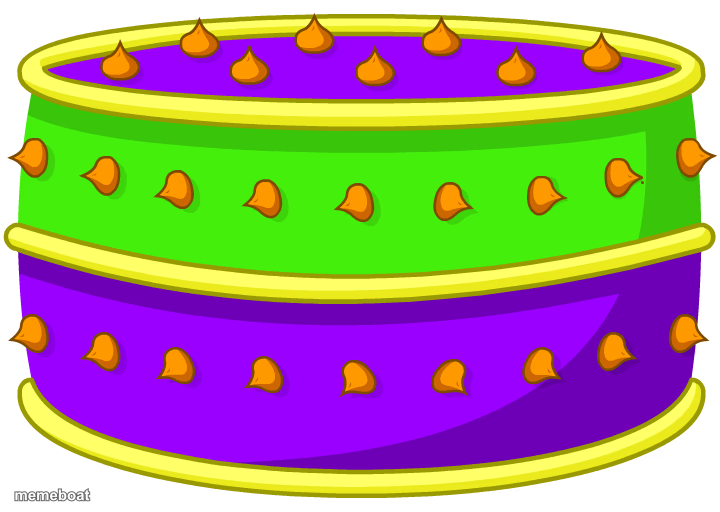
The purple-and-green striped Yoylecake from Battle for Dream Island, ready for whatever caption you want to slap on it. Caption and download free.
Blank Yoylecake meme template
Download the blank Yoylecake template to caption it yourself, or add your text right here in the editor above and download the finished meme.
When to use the Yoylecake meme
- Labeling something as the one thing nobody is allowed to touch
- BFDI fan in-jokes about the cake everyone fights over
- Reacting to someone hoarding food at a party
Yoylecake template facts
- Featuring
- Yoylecake (Battle for Dream Island)
- Dimensions
- 720 × 512 px
- Format
- PNG
- Text boxes
- 2
- Added
- 2025
About the Yoylecake meme template
It's just a cake. A weird, glowing, candy-topped cake from Battle for Dream Island that somehow became a whole meme unto itself in the BFDI fandom. No characters, no drama, just cake sitting there being cake.
Use it for anything that deserves to be treated like a sacred, untouchable object — inside jokes, "this but unironically," or genuinely just captioning your love of cake.
Popular Yoylecake caption ideas
YAY · GAMERCAKE
THE CAKE · NOBODY GETS A SLICE
MY SAVINGS ACCOUNT · TOUCH IT AND DIE
THIS MEME TEMPLATE · STILL UNDEFEATED
Templates similar to Yoylecake



Yoylecake meme FAQ
How do I make a Yoylecake meme?
Scroll up to the Yoylecake template, type your caption into the 2 text boxes in the editor above, adjust the font, size and color if you like, then click download. Your finished Yoylecake meme is ready to share in seconds.
Can I use the Yoylecake template for free?
Yes. The Yoylecake template is completely free to use — no signup and no limits on how many memes you create or where you share them.
How do I download my Yoylecake meme?
Click the download button under the editor once your Yoylecake meme looks right. It saves straight to your device as a high-quality PNG or JPEG image.
How do I download the blank Yoylecake template?
Use the "Download blank template" button in the blank Yoylecake template section above to save the original, un-captioned image — handy if you'd rather caption it in another app or keep a copy.