
Four BFDI Meme Generator
Create Your Four BFDI Meme

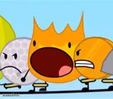
Four from Battle for Dream Island giving a wide-eyed, toothy stare straight at the camera. Great reaction template — caption and download free.
Blank Four BFDI meme template
Download the blank Four BFDI template to caption it yourself, or add your text right here in the editor above and download the finished meme.
When to use the Four BFDI meme
- Reacting when someone says something suspicious
- The face you make when you catch a lie mid-sentence
- Staring at your group chat after someone drops a bomb
- That look when the teacher says 'pop quiz'
Four BFDI template facts
- Featuring
- Four (Battle for Dream Island)
- Dimensions
- 193 × 261 px
- Format
- JPG
- Added
- 2025
About the Four BFDI meme template
Four, the numeral-shaped menace from Battle for Dream Island, staring dead ahead with that unsettling wide grin like they just heard something they shouldn't have. It's peak animated-object side-eye.
Works great as a reaction to shady behavior, awkward silences, or any moment where you just... know something's off. BFDI fans will recognize it instantly, and even people who've never watched the show get the vibe immediately.
Popular Four BFDI caption ideas
FOUR IS WATCHING U · DO UR TAXES
Templates similar to Four BFDI






Four BFDI meme FAQ
How do I make a Four BFDI meme?
Scroll up to the Four BFDI template, add your own text boxes in the editor above and type your captions, adjust the font, size and color if you like, then click download. Your finished Four BFDI meme is ready to share in seconds.
Can I use the Four BFDI template for free?
Yes. The Four BFDI template is completely free to use — no signup and no limits on how many memes you create or where you share them.
How do I download my Four BFDI meme?
Click the download button under the editor once your Four BFDI meme looks right. It saves straight to your device as a high-quality PNG or JPEG image.
How do I download the blank Four BFDI template?
Use the "Download blank template" button in the blank Four BFDI template section above to save the original, un-captioned image — handy if you'd rather caption it in another app or keep a copy.