
Youtube comments Meme Generator
Create Your Youtube comments Meme
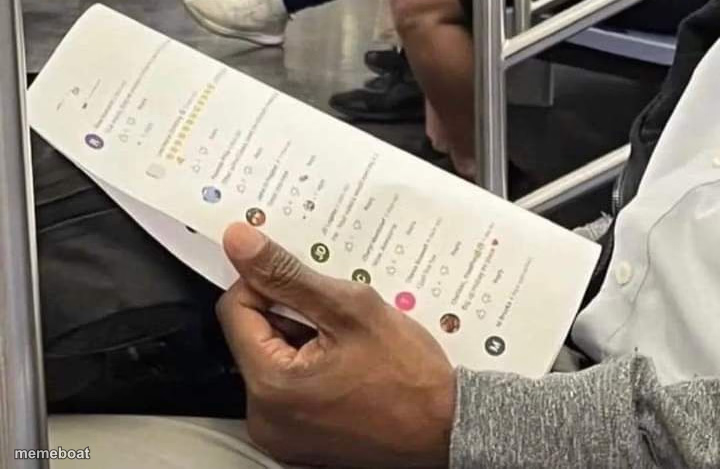
A man on a subway scrolls through a long list of social media comments and notifications on his phone. Add captions and download this template free.
Blank Youtube comments meme template
Download the blank Youtube comments template to caption it yourself, or add your text right here in the editor above and download the finished meme.
When to use the Youtube comments meme
- Checking if anyone liked your post yet (they haven't)
- Getting sucked into a comment section argument with a total stranger
- Doomscrolling instead of watching where your stop is
- Refreshing notifications every ten seconds on the commute
Youtube comments template facts
- Dimensions
- 720 × 469 px
- Format
- PNG
- Text boxes
- 2
- Added
- 2025
About the Youtube comments meme template
Just a regular commute, except this guy is deep in someone's comment section, thumb ready to scroll for the next twenty minutes. We've all been there — one notification turns into a full archaeological dig through replies.
Great for jokes about doomscrolling, checking if your post flopped, or getting sucked into an argument with a stranger online while the train rattles on around you.
Popular Youtube comments caption ideas
MY STOP WAS THREE STATIONS AGO · BUT SOMEONE'S WRONG ON THE INTERNET
CHECKING IF MY MEME · GOT ANY LIKES YET
READING THE COMMENTS · INSTEAD OF THE ARTICLE
Templates similar to Youtube comments



Youtube comments meme FAQ
How do I make a Youtube comments meme?
Scroll up to the Youtube comments template, type your caption into the 2 text boxes in the editor above, adjust the font, size and color if you like, then click download. Your finished Youtube comments meme is ready to share in seconds.
Can I use the Youtube comments template for free?
Yes. The Youtube comments template is completely free to use — no signup and no limits on how many memes you create or where you share them.
How do I download my Youtube comments meme?
Click the download button under the editor once your Youtube comments meme looks right. It saves straight to your device as a high-quality PNG or JPEG image.
How do I download the blank Youtube comments template?
Use the "Download blank template" button in the blank Youtube comments template section above to save the original, un-captioned image — handy if you'd rather caption it in another app or keep a copy.