
Comments are turned off Meme Generator
Create Your Comments are turned off Meme
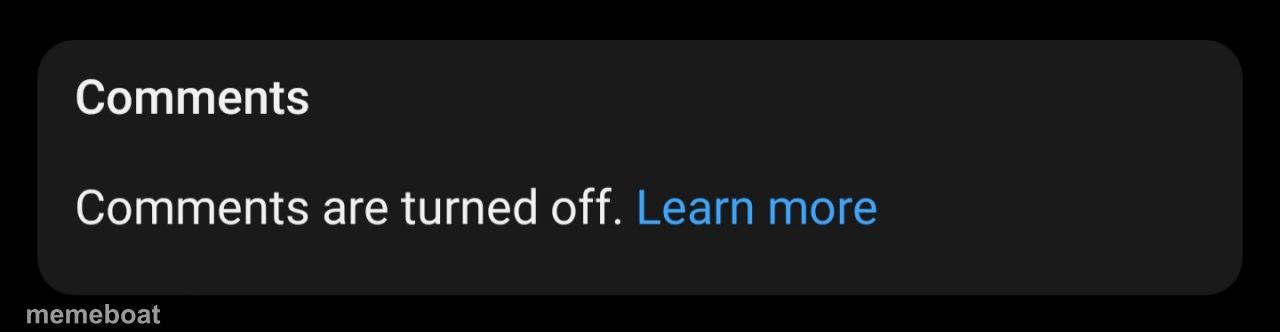
A fake iOS-style notification reading 'Comments are turned off.' Perfect for shutting down a joke, a debate, or an ex. Caption and download free.
Blank Comments are turned off meme template
Download the blank Comments are turned off template to caption it yourself, or add your text right here in the editor above and download the finished meme.
When to use the Comments are turned off meme
- Ending a group chat argument by declaring the topic officially closed
- Announcing you're done taking feedback on literally anything
- Replying to unsolicited advice with a fake system shutdown
- Capping off a heated comment section with mock finality
Comments are turned off template facts
- Dimensions
- 1280 × 332 px
- Format
- JPG
- Text boxes
- 2
- Added
- 2025
About the Comments are turned off meme template
This one's a dead ringer for the little dark-mode popup your phone throws at you when someone locks a comment section. Except here it's a blank canvas for you to turn off whatever you want — arguments, group chats, your own bad decisions.
It's the perfect passive-aggressive mic drop template. Use it to shut down a debate, end a bit, or announce that nobody's opinion matters anymore. Deadpan energy only.
Popular Comments are turned off caption ideas
Comments are turned off. · Mom found the group chat.
Comments are turned off. · I said what I said.
Comments are turned off. · This is a personal attack and I'm allowed to leave.
Templates similar to Comments are turned off




Comments are turned off meme FAQ
How do I make a Comments are turned off meme?
Scroll up to the Comments are turned off template, type your caption into the 2 text boxes in the editor above, adjust the font, size and color if you like, then click download. Your finished Comments are turned off meme is ready to share in seconds.
Can I use the Comments are turned off template for free?
Yes. The Comments are turned off template is completely free to use — no signup and no limits on how many memes you create or where you share them.
How do I download my Comments are turned off meme?
Click the download button under the editor once your Comments are turned off meme looks right. It saves straight to your device as a high-quality PNG or JPEG image.
How do I download the blank Comments are turned off template?
Use the "Download blank template" button in the blank Comments are turned off template section above to save the original, un-captioned image — handy if you'd rather caption it in another app or keep a copy.