
Horus Announcement Temp 2.0 Meme Generator
Create Your Horus Announcement Temp 2.0 Meme
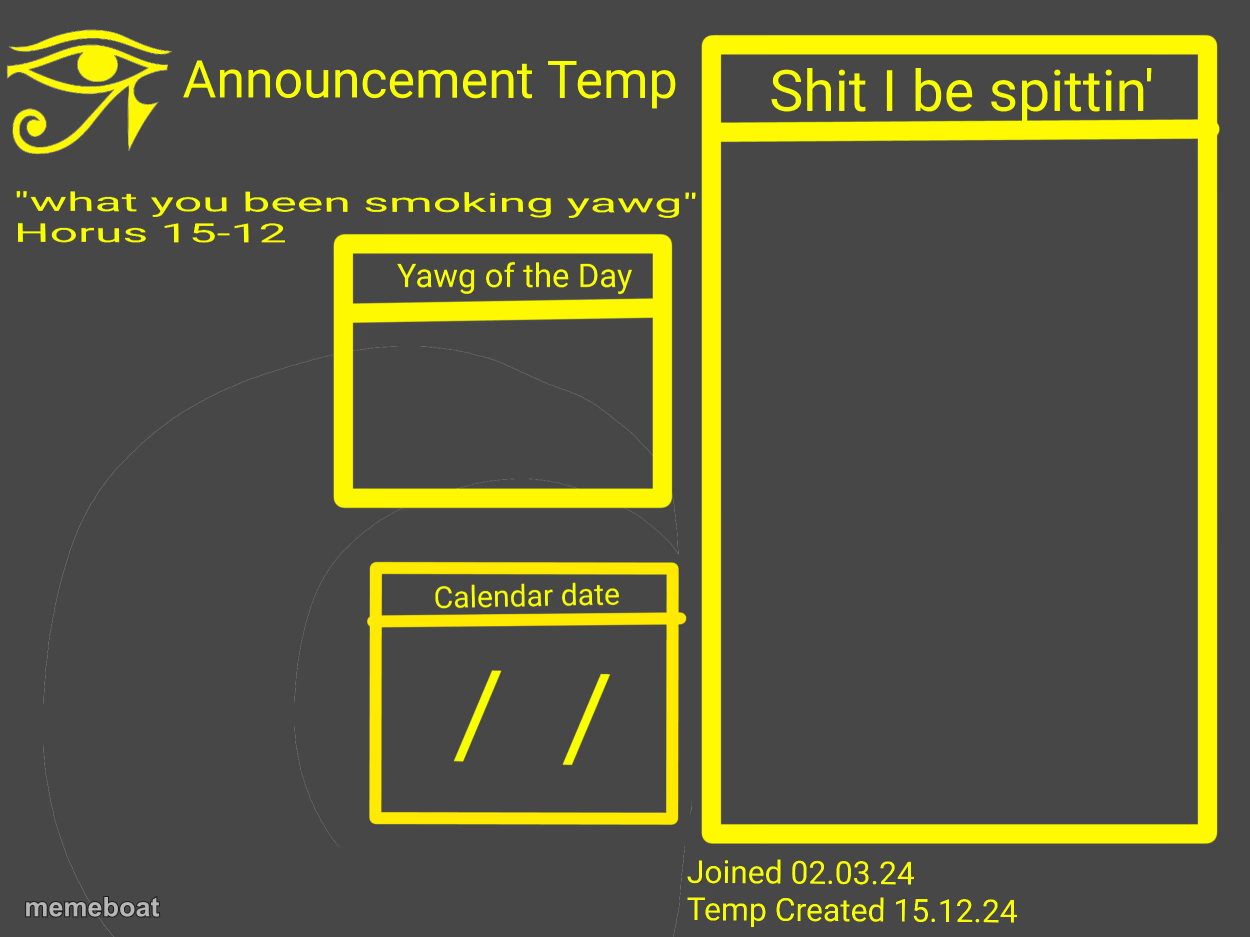
A niche announcement-style layout with an Eye of Horus icon and labeled boxes for daily updates or hot takes — caption it free, no sign-up needed.
Blank Horus Announcement Temp 2.0 meme template
Download the blank Horus Announcement Temp 2.0 template to caption it yourself, or add your text right here in the editor above and download the finished meme.
When to use the Horus Announcement Temp 2.0 meme
- posting a fake 'daily announcement' for your friend group
- mock community bulletin with a made-up headline
- parody of official-sounding server announcements
- any joke that wants a stamped, formal-looking layout
Horus Announcement Temp 2.0 template facts
- Dimensions
- 1250 × 937 px
- Format
- PNG
- Text boxes
- 2
- Added
- 2025
About the Horus Announcement Temp 2.0 meme template
This one's built like a little bulletin board: an Eye of Horus logo up top, a spot for your 'thing of the day,' a date box, and one big panel for whatever you actually want to say. It reads like a niche community's daily check-in format, the kind of in-joke template that only makes sense once you've seen a few of them.
Great for mock announcements, fake community updates, or any joke that wants that stamped, official-looking format. Slot in your own daily nonsense and let the boxes do the structuring for you.
Popular Horus Announcement Temp 2.0 caption ideas
What you been smoking today · Nothing, I just talk like this now
Yawg of the Day · Waking up and choosing violence
Calendar update · Still not a leap year excuse
Templates similar to Horus Announcement Temp 2.0





Horus Announcement Temp 2.0 meme FAQ
How do I make a Horus Announcement Temp 2.0 meme?
Scroll up to the Horus Announcement Temp 2.0 template, type your caption into the 2 text boxes in the editor above, adjust the font, size and color if you like, then click download. Your finished Horus Announcement Temp 2.0 meme is ready to share in seconds.
Can I use the Horus Announcement Temp 2.0 template for free?
Yes. The Horus Announcement Temp 2.0 template is completely free to use — no signup and no limits on how many memes you create or where you share them.
How do I download my Horus Announcement Temp 2.0 meme?
Click the download button under the editor once your Horus Announcement Temp 2.0 meme looks right. It saves straight to your device as a high-quality PNG or JPEG image.
How do I download the blank Horus Announcement Temp 2.0 template?
Use the "Download blank template" button in the blank Horus Announcement Temp 2.0 template section above to save the original, un-captioned image — handy if you'd rather caption it in another app or keep a copy.