
You can no has Meme Generator
Create Your You can no has Meme
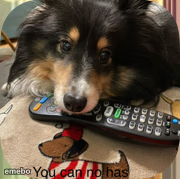
A fluffy Sheltie guarding a TV remote like it's a bone. Perfect for anyone who's had their control stolen. Caption it and download free.
Blank You can no has meme template
Download the blank You can no has template to caption it yourself, or add your text right here in the editor above and download the finished meme.
When to use the You can no has meme
- When you grab the last slice before anyone else can call it
- Refusing to share the WiFi password with visiting family
- Guarding your parking spot like it's a sacred artifact
- That one coworker who won't give the good stapler back
You can no has template facts
- Dimensions
- 180 × 179 px
- Format
- PNG
- Text boxes
- 2
- Added
- 2025
About the You can no has meme template
This good boy has claimed the TV remote and he is NOT giving it back. Doesn't matter what's on, doesn't matter whose turn it is — that remote belongs to the dog now, end of discussion.
Use it for petty ownership disputes, roommate drama over the couch, or just any time someone tells you 'no' with maximum smugness. Works great with possessive, gremlin-energy captions.
Popular You can no has caption ideas
Me with the last charger in the house · You can no has
The one good pen at work · You can no has
My side of the bed at 3am · You can no has
Templates similar to You can no has



You can no has meme FAQ
How do I make a You can no has meme?
Scroll up to the You can no has template, type your caption into the 2 text boxes in the editor above, adjust the font, size and color if you like, then click download. Your finished You can no has meme is ready to share in seconds.
Can I use the You can no has template for free?
Yes. The You can no has template is completely free to use — no signup and no limits on how many memes you create or where you share them.
How do I download my You can no has meme?
Click the download button under the editor once your You can no has meme looks right. It saves straight to your device as a high-quality PNG or JPEG image.
How do I download the blank You can no has template?
Use the "Download blank template" button in the blank You can no has template section above to save the original, un-captioned image — handy if you'd rather caption it in another app or keep a copy.