
can u dont Meme Generator
Create Your can u dont Meme
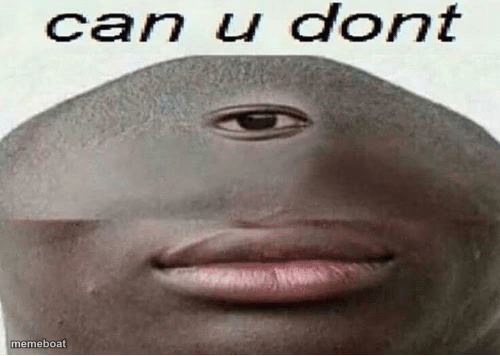
The surreal 'can u dont' face-blend meme — one eye, big lips, pure confusion. Perfect for shutting down bad ideas. Caption and download free.
Blank can u dont meme template
Download the blank can u dont template to caption it yourself, or add your text right here in the editor above and download the finished meme.
When to use the can u dont meme
- Reacting to a truly bad text message screenshot
- When someone starts an opinion with 'not to be that person but'
- Group chat sending unsolicited hot takes at 1am
can u dont template facts
- Featuring
- Can U Dont (internet meme)
- Dimensions
- 500 × 356 px
- Format
- PNG
- Text boxes
- 1
- Added
- 2025
About the can u dont meme template
The classic 'can u dont' image: two mismatched face halves smashed together into one uncanny single-eyed mug, captioned with the internet's most polite way of telling someone to stop. It's unsettling, it's blunt, it's exactly what you need when words fail you.
Drop it under screenshots of bad takes, cringe texts, or anyone doing too much. It's the visual equivalent of a slow blink and a sigh — works for roasting friends, exes, or that one group chat opinion nobody asked for.
Popular can u dont caption ideas
can u dont
can u just... dont
Templates similar to can u dont



can u dont meme FAQ
How do I make a can u dont meme?
Scroll up to the can u dont template, type your caption into the text box in the editor above, adjust the font, size and color if you like, then click download. Your finished can u dont meme is ready to share in seconds.
Can I use the can u dont template for free?
Yes. The can u dont template is completely free to use — no signup and no limits on how many memes you create or where you share them.
How do I download my can u dont meme?
Click the download button under the editor once your can u dont meme looks right. It saves straight to your device as a high-quality PNG or JPEG image.
How do I download the blank can u dont template?
Use the "Download blank template" button in the blank can u dont template section above to save the original, un-captioned image — handy if you'd rather caption it in another app or keep a copy.