
YARRR!!!!!! Meme Generator
Create Your YARRR!!!!!! Meme
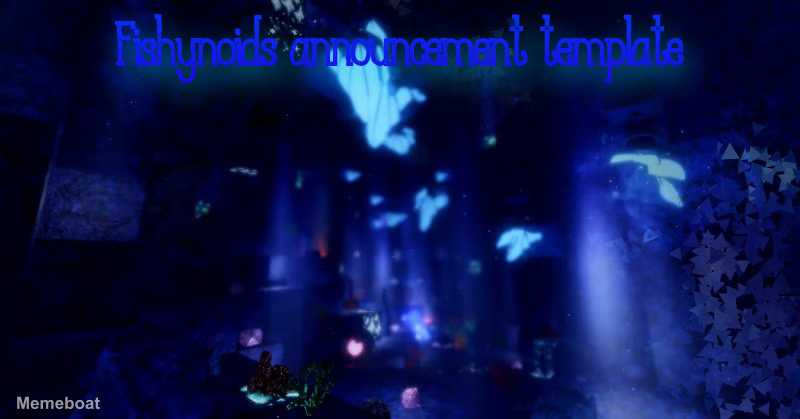
A moody underwater-cave scene with glowing lights, perfect for dramatic reveals or announcements. Add your own caption and download free.
Blank YARRR!!!!!! meme template
Download the blank YARRR!!!!!! template to caption it yourself, or add your text right here in the editor above and download the finished meme.
When to use the YARRR!!!!!! meme
- Announcing a huge (fake) update nobody asked for
- Setting up a dramatic reveal in a group chat
- Mocking overly serious game-trailer announcements
YARRR!!!!!! template facts
- Dimensions
- 800 × 419 px
- Format
- JPG
- Text boxes
- 1
- Added
- 2026
About the YARRR!!!!!! meme template
Deep blue caverns, glowing motes drifting like fireflies, and a shaft of eerie light — this one already feels like the intro card to something big. It's built for the moment before the punchline, the dramatic pause before you drop news nobody saw coming.
Use it for fake game-update reveals, ominous group-chat announcements, or any joke that wants a little cinematic weight behind it. Swap in your own text and let the glow do the heavy lifting.
Popular YARRR!!!!!! caption ideas
WE ARE 67, WE MUSTARD THE MANGOES
BREAKING: THE GROUP CHAT HAS A NEW ADMIN
ATTENTION: MERCURY IS IN RETROGRADE AGAIN
WARNING: SOMEONE REPLIED-ALL
Templates similar to YARRR!!!!!!



YARRR!!!!!! meme FAQ
How do I make a YARRR!!!!!! meme?
Scroll up to the YARRR!!!!!! template, type your caption into the text box in the editor above, adjust the font, size and color if you like, then click download. Your finished YARRR!!!!!! meme is ready to share in seconds.
Can I use the YARRR!!!!!! template for free?
Yes. The YARRR!!!!!! template is completely free to use — no signup and no limits on how many memes you create or where you share them.
How do I download my YARRR!!!!!! meme?
Click the download button under the editor once your YARRR!!!!!! meme looks right. It saves straight to your device as a high-quality PNG or JPEG image.
How do I download the blank YARRR!!!!!! template?
Use the "Download blank template" button in the blank YARRR!!!!!! template section above to save the original, un-captioned image — handy if you'd rather caption it in another app or keep a copy.