
Side-Eye Dog Meme Generator
Create Your Side-Eye Dog Meme
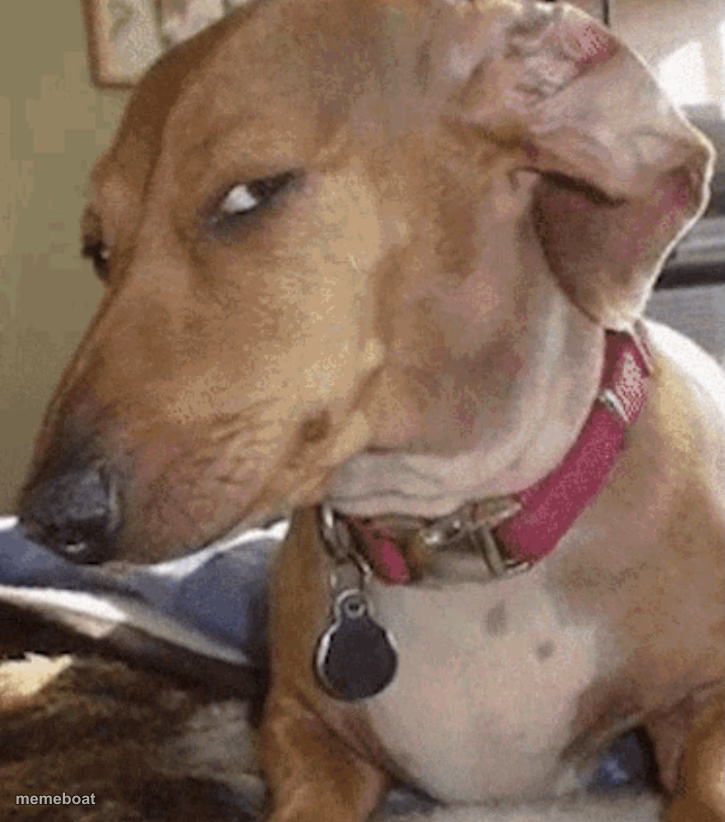
Also known as: Dog Giving Side Eye · Sus Dog · Capping Dog
A dog giving the ultimate slow, judgmental side-eye without moving its head an inch. Perfect for silent disapproval or catching someone in the act. Caption it free.
Blank Side-Eye Dog meme template
Download the blank Side-Eye Dog template to caption it yourself, or add your text right here in the editor above and download the finished meme.
When to use the Side-Eye Dog meme
- Catching someone mid-lie and saying nothing
- Reacting silently to a terrible decision a friend just made
Side-Eye Dog template facts
- Dimensions
- 725 × 822 px
- Format
- JPG
- Text boxes
- 1
- Added
- 2025
About the Side-Eye Dog meme template
This dog has heard enough. Without turning its head even a little, it's rolled its eyes all the way to the side to deliver a look that says 'I saw that, and I'm disappointed.'
Great for moments of pure, wordless judgment — catching a friend in a lie, side-eyeing a bad decision, or just reacting to anything that deserves silent disapproval instead of a comment.
Popular Side-Eye Dog caption ideas
WHEN YOUR FRIEND SAYS 'I'LL PAY YOU BACK'
ME LISTENING TO YOUR EXCUSE
WHEN SOMEONE SAYS THEY'RE 'FINE'
Templates similar to Side-Eye Dog


Side-Eye Dog meme FAQ
How do I make a Side-Eye Dog meme?
Scroll up to the Side-Eye Dog template, type your caption into the text box in the editor above, adjust the font, size and color if you like, then click download. Your finished Side-Eye Dog meme is ready to share in seconds.
Can I use the Side-Eye Dog template for free?
Yes. The Side-Eye Dog template is completely free to use — no signup and no limits on how many memes you create or where you share them.
How do I download my Side-Eye Dog meme?
Click the download button under the editor once your Side-Eye Dog meme looks right. It saves straight to your device as a high-quality PNG or JPEG image.
How do I download the blank Side-Eye Dog template?
Use the "Download blank template" button in the blank Side-Eye Dog template section above to save the original, un-captioned image — handy if you'd rather caption it in another app or keep a copy.