
womp womp. Meme Generator
Create Your womp womp. Meme
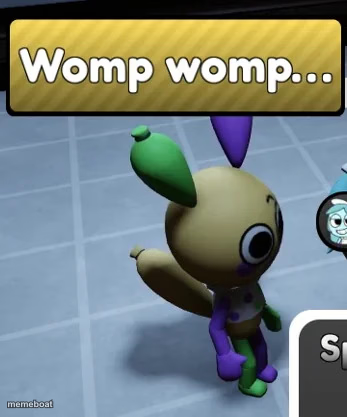
Creepy tan bunny plush with purple ears sasses back with baked-in 'Womp womp...' text — the go-to reaction for shutting down excuses. Caption it free.
Blank womp womp. meme template
Download the blank womp womp. template to caption it yourself, or add your text right here in the editor above and download the finished meme.
When to use the womp womp. meme
- Someone explains why they're late for the third time this week
- A friend says their diet starts Monday, again
- Replying to someone's excuse for missing your event
- Reacting to a coworker's 'the dog ate my report' story
womp womp. template facts
- Dimensions
- 347 × 417 px
- Format
- JPG
- Added
- 2025
About the womp womp. meme template
This unsettling little bunny plush — tan body, purple ears, green paws, and a stare that's seen some things — already comes loaded with the internet's favorite dismissal: "Womp womp..." It's the perfect stand-in for every time someone's sob story gets zero sympathy.
Whether it reminds you of a low-poly horror game critter or just an off-brand Easter toy that wandered onto a checkered floor, the deadpan energy is universal. Swap in your own excuse-crusher caption and let this bunny deliver the bad news with a smile.
Templates similar to womp womp.





womp womp. meme FAQ
How do I make a womp womp. meme?
Scroll up to the womp womp. template, add your own text boxes in the editor above and type your captions, adjust the font, size and color if you like, then click download. Your finished womp womp. meme is ready to share in seconds.
Can I use the womp womp. template for free?
Yes. The womp womp. template is completely free to use — no signup and no limits on how many memes you create or where you share them.
How do I download my womp womp. meme?
Click the download button under the editor once your womp womp. meme looks right. It saves straight to your device as a high-quality PNG or JPEG image.
How do I download the blank womp womp. template?
Use the "Download blank template" button in the blank womp womp. template section above to save the original, un-captioned image — handy if you'd rather caption it in another app or keep a copy.