
Odd Blue Apple Meme Generator
Create Your Odd Blue Apple Meme
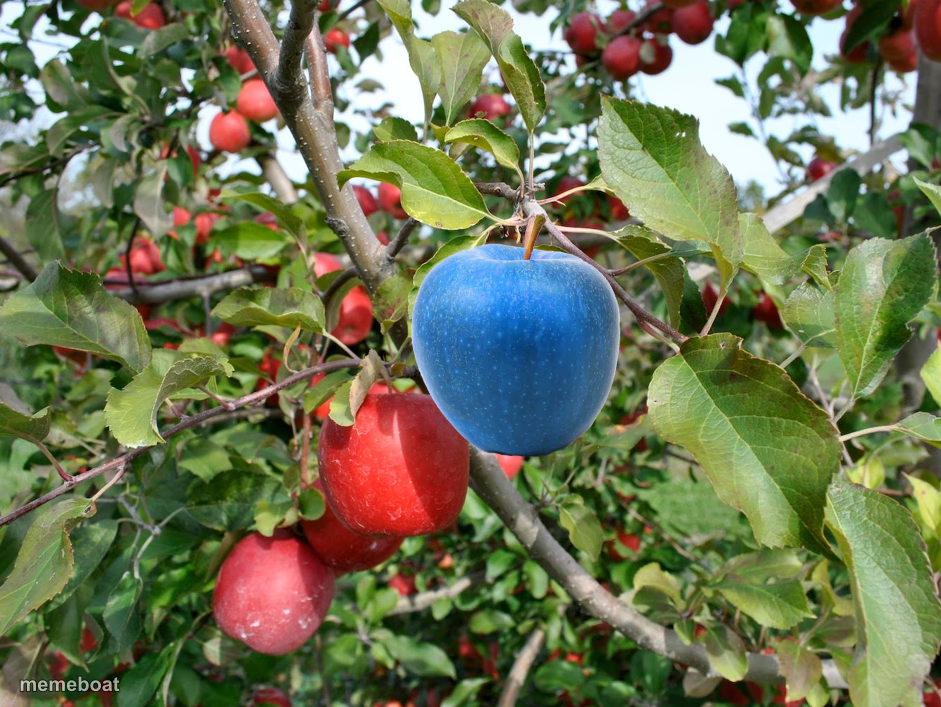
A single blue apple hanging among a tree full of red apples — the perfect 'odd one out' template for standing apart from the crowd. Free to caption.
Blank Odd Blue Apple meme template
Download the blank Odd Blue Apple template to caption it yourself, or add your text right here in the editor above and download the finished meme.
When to use the Odd Blue Apple meme
- Being the only one in the group chat with a weird opinion
- Standing out at a family event because you're just built different
- That one coworker whose answer never matches everyone else's
Odd Blue Apple template facts
- Dimensions
- 941 × 707 px
- Format
- PNG
- Added
- 2025
About the Odd Blue Apple meme template
A whole orchard of normal red apples, and then this one weirdo hanging right in the middle, dyed blue like it wandered in from a different photoshoot. Nobody asked it to be different, it just is.
This is your go-to template for standing out, being the exception, or that one friend/coworker/family member who just does things differently. Works great for identity jokes, minority-opinion humor, or "one of these things is not like the others" setups.
Popular Odd Blue Apple caption ideas
WELL I THINK · WE BE GROWING BLUE APPLES NOW
Templates similar to Odd Blue Apple





Odd Blue Apple meme FAQ
How do I make a Odd Blue Apple meme?
Scroll up to the Odd Blue Apple template, add your own text boxes in the editor above and type your captions, adjust the font, size and color if you like, then click download. Your finished Odd Blue Apple meme is ready to share in seconds.
Can I use the Odd Blue Apple template for free?
Yes. The Odd Blue Apple template is completely free to use — no signup and no limits on how many memes you create or where you share them.
How do I download my Odd Blue Apple meme?
Click the download button under the editor once your Odd Blue Apple meme looks right. It saves straight to your device as a high-quality PNG or JPEG image.
How do I download the blank Odd Blue Apple template?
Use the "Download blank template" button in the blank Odd Blue Apple template section above to save the original, un-captioned image — handy if you'd rather caption it in another app or keep a copy.