
Vector: Hey Meme Generator
Create Your Vector: Hey Meme
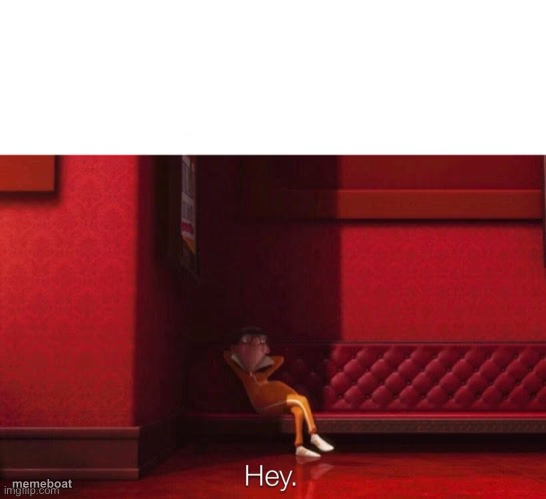
Vector slouched against a red wall saying 'Hey.' — the deadpan awkward-greeting meme. Add your own caption and download free.
Blank Vector: Hey meme template
Download the blank Vector: Hey template to caption it yourself, or add your text right here in the editor above and download the finished meme.
When to use the Vector: Hey meme
- Texting your ex 'hey' at 2am for absolutely no reason
- Walking into a room you weren't invited to and playing it cool
- Replying to a text three days late like nothing happened
- Trying to act casual after doing something extremely suspicious
Vector: Hey template facts
- Featuring
- Vector (Despicable Me)
- Dimensions
- 546 × 499 px
- Format
- JPG
- Text boxes
- 2
- Added
- 2025
About the Vector: Hey meme template
Vector, the orange-jumpsuited would-be supervillain from Despicable Me, slumped against a plush red wall with the flattest possible 'Hey.' This is the go-to template for painfully awkward, deadpan greetings — the moment you say hi and immediately regret existing.
Use it for that unbothered, so-smooth-it's-cringe energy: the text-back nobody wanted, the reply that took three days, or just showing up somewhere you clearly weren't invited. Drop your own top line in and let Vector's slouch do the rest of the talking.
Popular Vector: Hey caption ideas
Me after not texting her for 3 weeks · Hey.
When you get caught snooping but keep your cool · Hey.
Showing up uninvited to the party · Hey.
Templates similar to Vector: Hey





Vector: Hey meme FAQ
How do I make a Vector: Hey meme?
Scroll up to the Vector: Hey template, type your caption into the 2 text boxes in the editor above, adjust the font, size and color if you like, then click download. Your finished Vector: Hey meme is ready to share in seconds.
Can I use the Vector: Hey template for free?
Yes. The Vector: Hey template is completely free to use — no signup and no limits on how many memes you create or where you share them.
How do I download my Vector: Hey meme?
Click the download button under the editor once your Vector: Hey meme looks right. It saves straight to your device as a high-quality PNG or JPEG image.
How do I download the blank Vector: Hey template?
Use the "Download blank template" button in the blank Vector: Hey template section above to save the original, un-captioned image — handy if you'd rather caption it in another app or keep a copy.