
Keyboard Upgrade Go Back Meme Generator
Create Your Keyboard Upgrade Go Back Meme
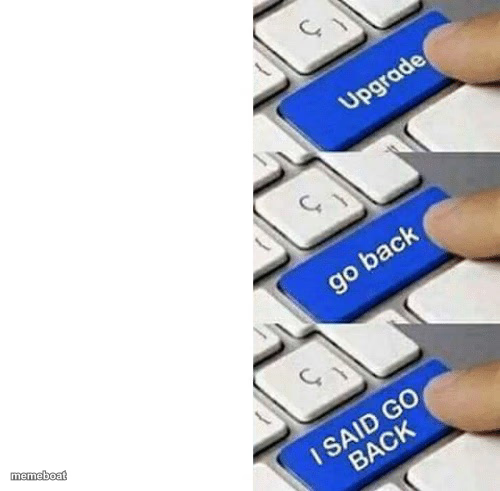
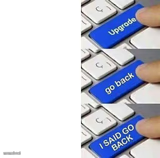
Three fingers pressing keyboard keys labeled Upgrade, Go Back, and I Said Go Back — the classic regret-and-panic template. Caption it and download free.
Blank Keyboard Upgrade Go Back meme template
Download the blank Keyboard Upgrade Go Back template to caption it yourself, or add your text right here in the editor above and download the finished meme.
When to use the Keyboard Upgrade Go Back meme
- Updating an app and immediately wanting the old version back
- Any decision you regret the second you commit to it
- Software patches that make things worse, not better
- Realizing a life choice needs an undo button that doesn't exist
Keyboard Upgrade Go Back template facts
- Dimensions
- 500 × 491 px
- Format
- JPG
- Text boxes
- 3
- Added
- 2025
About the Keyboard Upgrade Go Back meme template
This one is a masterclass in escalating panic told entirely through keyboard keys. First there's optimism (Upgrade), then instant regret (go back), and finally full-blown desperation (I SAID GO BACK, in caps, because now it's an emergency).
Popular Keyboard Upgrade Go Back caption ideas
Install Windows update · Computer won't boot · PLEASE JUST WORK AGAIN
Text my ex "hey" · See the read receipt · DELETE THE MESSAGE NOW
Dye my hair blue · Look in the mirror · ANY COLOR BUT THIS ONE
Templates similar to Keyboard Upgrade Go Back
Keyboard Upgrade Go Back meme FAQ
How do I make a Keyboard Upgrade Go Back meme?
Scroll up to the Keyboard Upgrade Go Back template, type your caption into the 3 text boxes in the editor above, adjust the font, size and color if you like, then click download. Your finished Keyboard Upgrade Go Back meme is ready to share in seconds.
Can I use the Keyboard Upgrade Go Back template for free?
Yes. The Keyboard Upgrade Go Back template is completely free to use — no signup and no limits on how many memes you create or where you share them.
How do I download my Keyboard Upgrade Go Back meme?
Click the download button under the editor once your Keyboard Upgrade Go Back meme looks right. It saves straight to your device as a high-quality PNG or JPEG image.
How do I download the blank Keyboard Upgrade Go Back template?
Use the "Download blank template" button in the blank Keyboard Upgrade Go Back template section above to save the original, un-captioned image — handy if you'd rather caption it in another app or keep a copy.