
U Good No Meme Generator
Create Your U Good No Meme
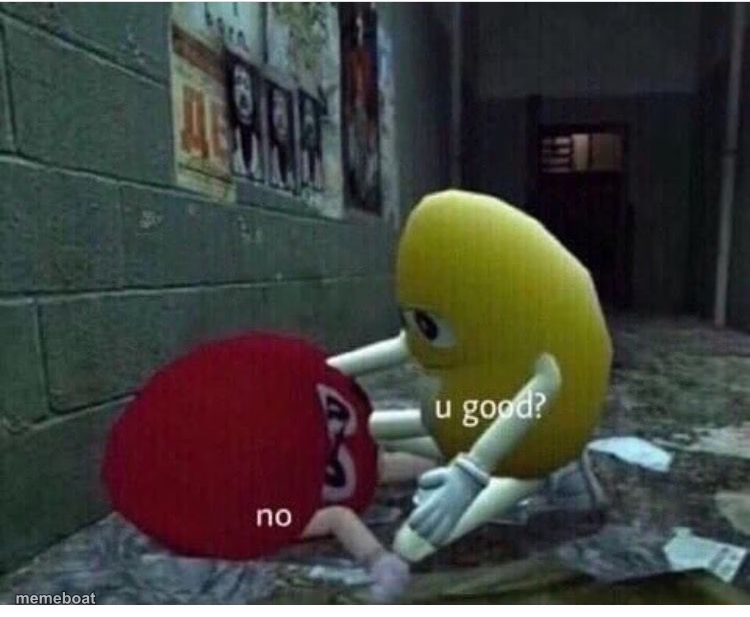
Yellow M&M crouches over a collapsed Red M&M in a trashed building asking 'u good?' - 'no'. Perfect for checking in on someone who's clearly not okay. Caption free.
Blank U Good No meme template
Download the blank U Good No template to caption it yourself, or add your text right here in the editor above and download the finished meme.
When to use the U Good No meme
- Someone asks if you're okay after finals week destroyed you
- Checking on a friend after their team lost in overtime
- Your bank account after rent is due
- Asking your code if it's okay after the deploy failed
U Good No template facts
- Dimensions
- 750 × 617 px
- Format
- PNG
- Added
- 2025
About the U Good No meme template
The Yellow M&M has found Red face-down on the floor of what looks like an abandoned Soviet apartment block, and he's asking the important question: u good? The answer, obviously, is no. It's the perfect visual for that moment when someone asks if you're fine and you are extremely not fine.
Use it for exam week, Mondays, the group chat after a bad take, or literally any time you want to caption the gap between a polite check-in and the honest answer. Swap the text, keep the despair, and download it free.
Templates similar to U Good No
U Good No meme FAQ
How do I make a U Good No meme?
Scroll up to the U Good No template, add your own text boxes in the editor above and type your captions, adjust the font, size and color if you like, then click download. Your finished U Good No meme is ready to share in seconds.
Can I use the U Good No template for free?
Yes. The U Good No template is completely free to use — no signup and no limits on how many memes you create or where you share them.
How do I download my U Good No meme?
Click the download button under the editor once your U Good No meme looks right. It saves straight to your device as a high-quality PNG or JPEG image.
How do I download the blank U Good No template?
Use the "Download blank template" button in the blank U Good No template section above to save the original, un-captioned image — handy if you'd rather caption it in another app or keep a copy.