
Stoner Lemur Meme Generator
Create Your Stoner Lemur Meme
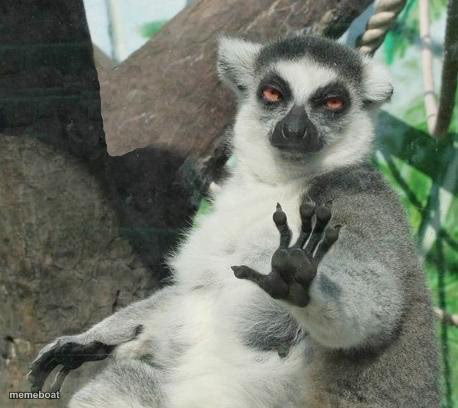
Also known as: No thanks lemur
A ring-tailed lemur holds up a clawed hand like it's flatly rejecting your offer. Caption its 'no thanks' pose and download free.
Blank Stoner Lemur meme template
Download the blank Stoner Lemur template to caption it yourself, or add your text right here in the editor above and download the finished meme.
When to use the Stoner Lemur meme
- Declining an invite to help someone move apartments
- Turning down a 'quick call' that's definitely not going to be quick
- Refusing to look at group chat notifications after a long day
Stoner Lemur template facts
- Dimensions
- 458 × 408 px
- Format
- JPG
- Text boxes
- 1
- Added
- 2025
About the Stoner Lemur meme template
A ring-tailed lemur sits with its red-orange eyes fixed on the camera, one hand raised with the palm facing out and the fingers spread in a firm refusal. Used to decline an invite, turn down a call that will run long, or ignore group chat notifications after a long day.
Popular Stoner Lemur caption ideas
🦃 · 🎍 · 🍍 · LADY'S I'M AT WORK AND NO I'M NOT KING JULIAN
when they ask if you can 'jump on a quick call'
me, being offered pineapple on pizza
my response to any plan that starts with 'so hear me out'


Stoner Lemur meme FAQ
How do I make a Stoner Lemur meme?
Scroll up to the Stoner Lemur template, type your caption into the text box in the editor above, adjust the font, size and color if you like, then click download. Your finished Stoner Lemur meme is ready to share in seconds.
Can I use the Stoner Lemur template for free?
Yes. The Stoner Lemur template is completely free to use — no signup and no limits on how many memes you create or where you share them.
How do I download my Stoner Lemur meme?
Click the download button under the editor once your Stoner Lemur meme looks right. It saves straight to your device as a high-quality PNG or JPEG image.
How do I download the blank Stoner Lemur template?
Use the "Download blank template" button in the blank Stoner Lemur template section above to save the original, un-captioned image — handy if you'd rather caption it in another app or keep a copy.