
Sneaky fox Meme Generator
Create Your Sneaky fox Meme
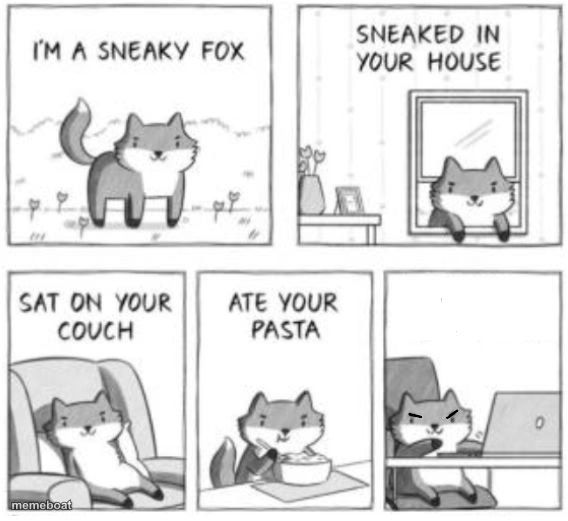
The 5-panel Sneaky Fox comic — fox breaks in, sits on your couch, eats your pasta, hijacks your laptop. Free to remix and caption on Memeboat.
Blank Sneaky fox meme template
Download the blank Sneaky fox template to caption it yourself, or add your text right here in the editor above and download the finished meme.
When to use the Sneaky fox meme
- A roommate or pet slowly taking over your entire life uninvited
- Something small and harmless escalating into full chaos step by step
- Anyone who 'just needs five minutes' and ends up staying all day
- That one coworker who starts small and ends up running the whole project
Sneaky fox template facts
- Dimensions
- 568 × 521 px
- Format
- JPG
- Added
- 2025
About the Sneaky fox meme template
A cute little cartoon fox announces itself as sneaky, sneaks into your house, sits on your couch like it pays rent, eats your pasta, and finally ends up scheming at your laptop with a devious little smirk. Escalation comedy in five clean panels.
Use it for any story of small harmless-seeming actions snowballing into total takeover — a new hire, a clingy situationship, scope creep on a project, or literally any houseguest who overstays their welcome.
Templates similar to Sneaky fox



Sneaky fox meme FAQ
How do I make a Sneaky fox meme?
Scroll up to the Sneaky fox template, add your own text boxes in the editor above and type your captions, adjust the font, size and color if you like, then click download. Your finished Sneaky fox meme is ready to share in seconds.
Can I use the Sneaky fox template for free?
Yes. The Sneaky fox template is completely free to use — no signup and no limits on how many memes you create or where you share them.
How do I download my Sneaky fox meme?
Click the download button under the editor once your Sneaky fox meme looks right. It saves straight to your device as a high-quality PNG or JPEG image.
How do I download the blank Sneaky fox template?
Use the "Download blank template" button in the blank Sneaky fox template section above to save the original, un-captioned image — handy if you'd rather caption it in another app or keep a copy.