
Ali G Confused Meme Generator
Create Your Ali G Confused Meme
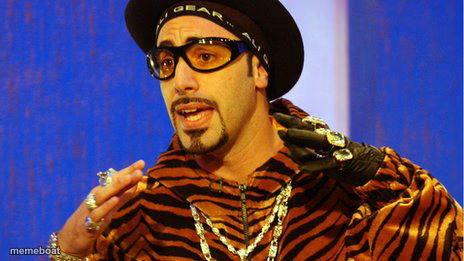
Also known as: Shutup Batty Boy
Ali G mid-rant in his tracksuit and tinted shades, looking baffled and defensive. Great for clueless takes and 'wait, what?' moments — caption free.
Blank Ali G Confused meme template
Download the blank Ali G Confused template to caption it yourself, or add your text right here in the editor above and download the finished meme.
When to use the Ali G Confused meme
- Explaining a terrible take like it's obvious
- Reacting to a question you clearly don't understand
- Defending yourself with confidence but zero facts
- Interrupting to say something completely off-topic
Ali G Confused template facts
- Featuring
- Ali G (Da Ali G Show)
- Dimensions
- 464 × 261 px
- Format
- JPG
- Text boxes
- 1
- Added
- 2025
About the Ali G Confused meme template
Ali G, Sacha Baron Cohen's iconic wannabe-gangster interviewer character, caught mid-sentence with his hands up like he's about to explain something that makes zero sense. The gold chains and tiger-print tracksuit do the talking before he even opens his mouth.
Popular Ali G Confused caption ideas
When someone asks what you actually do at work
Is it because I is... right?
Templates similar to Ali G Confused




Ali G Confused meme FAQ
How do I make a Ali G Confused meme?
Scroll up to the Ali G Confused template, type your caption into the text box in the editor above, adjust the font, size and color if you like, then click download. Your finished Ali G Confused meme is ready to share in seconds.
Can I use the Ali G Confused template for free?
Yes. The Ali G Confused template is completely free to use — no signup and no limits on how many memes you create or where you share them.
How do I download my Ali G Confused meme?
Click the download button under the editor once your Ali G Confused meme looks right. It saves straight to your device as a high-quality PNG or JPEG image.
How do I download the blank Ali G Confused template?
Use the "Download blank template" button in the blank Ali G Confused template section above to save the original, un-captioned image — handy if you'd rather caption it in another app or keep a copy.