Ron Burgundy Meme Generator
Create Your Ron Burgundy Meme
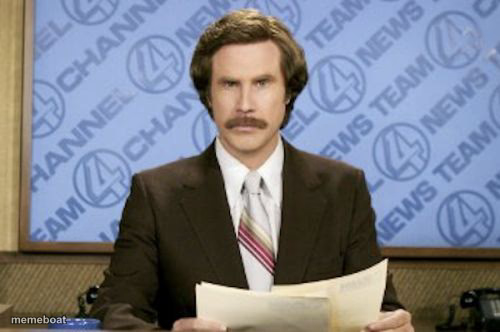
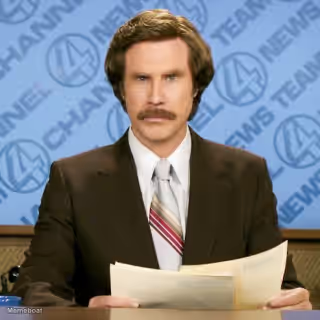
A serious-faced news anchor in a brown suit sits behind a desk with news channel graphics behind him, holding papers. Fits deadpan announcements or overly formal reactions. Caption and download free.
Blank Ron Burgundy meme template
Download the blank Ron Burgundy template to caption it yourself, or add your text right here in the editor above and download the finished meme.
When to use the Ron Burgundy meme
- making a deadpan announcement
- delivering bad news formally
- pretending to be professional
Ron Burgundy template facts
- Dimensions
- 500 × 332 px
- Format
- JPG
- Text boxes
- 2
- Added
- 2025
About the Ron Burgundy meme template
Ron Burgundy, the fictional anchorman, sits at a news desk in a brown suit, tie and thick mustache, holding a stack of papers in front of a "Channel 4 News Team" backdrop. He looks straight ahead with a flat, serious face. Used for making a deadpan announcement, delivering bad news formally, or pretending to be professional.
Popular Ron Burgundy caption ideas
Breaking news: · I still haven't done laundry
This is CNN · Just kidding, it's my group chat
In today's top story · Nobody asked but here we are



Ron Burgundy meme FAQ
How do I make a Ron Burgundy meme?
Scroll up to the Ron Burgundy template, type your caption into the 2 text boxes in the editor above, adjust the font, size and color if you like, then click download. Your finished Ron Burgundy meme is ready to share in seconds.
Can I use the Ron Burgundy template for free?
Yes. The Ron Burgundy template is completely free to use — no signup and no limits on how many memes you create or where you share them.
How do I download my Ron Burgundy meme?
Click the download button under the editor once your Ron Burgundy meme looks right. It saves straight to your device as a high-quality PNG or JPEG image.
How do I download the blank Ron Burgundy template?
Use the "Download blank template" button in the blank Ron Burgundy template section above to save the original, un-captioned image — handy if you'd rather caption it in another app or keep a copy.