
Robert Downey Jr Emotional Meme Generator
Robert Downey Jr. standing by a car with his eyes closed and hand on his chest, overwhelmed. Perfect for 'trying to hold it together' jokes.
Create Your Robert Downey Jr Emotional Meme
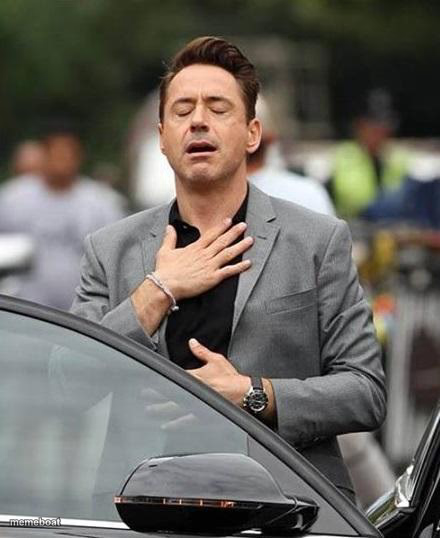
Blank Robert Downey Jr Emotional meme template
Download the blank Robert Downey Jr Emotional template to caption it yourself, or add your text right here in the editor above and download the finished meme.
When to use the Robert Downey Jr Emotional meme
- Trying not to cry after finishing a great TV series finale
- Holding back tears at a wedding you weren't even that close to
- The face you make when your favorite character finally gets closure
Robert Downey Jr Emotional template facts
- Featuring
- Robert Downey Jr.
- Dimensions
- 440 × 538 px
- Format
- JPG
- Added
- 2025
About the Robert Downey Jr Emotional meme template
Robert Downey Jr. caught candidly outside a car, eyes shut, hand pressed to his chest like he's either having a moment of deep gratitude or trying very hard not to cry in public. Either way, the energy is 'I am fine, everything is fine.'

Robert Downey Jr Emotional meme FAQ
How do I make a Robert Downey Jr Emotional meme?
Scroll up to the Robert Downey Jr Emotional template, add your own text boxes in the editor above and type your captions, adjust the font, size and color if you like, then click download. Your finished Robert Downey Jr Emotional meme is ready to share in seconds.
Can I use the Robert Downey Jr Emotional template for free?
Yes. The Robert Downey Jr Emotional template is completely free to use — no signup and no limits on how many memes you create or where you share them.
How do I download my Robert Downey Jr Emotional meme?
Click the download button under the editor once your Robert Downey Jr Emotional meme looks right. It saves straight to your device as a high-quality PNG or JPEG image.
How do I download the blank Robert Downey Jr Emotional template?
Use the "Download blank template" button in the blank Robert Downey Jr Emotional template section above to save the original, un-captioned image — handy if you'd rather caption it in another app or keep a copy.