
Riker Pointing Meme Generator
Create Your Riker Pointing Meme
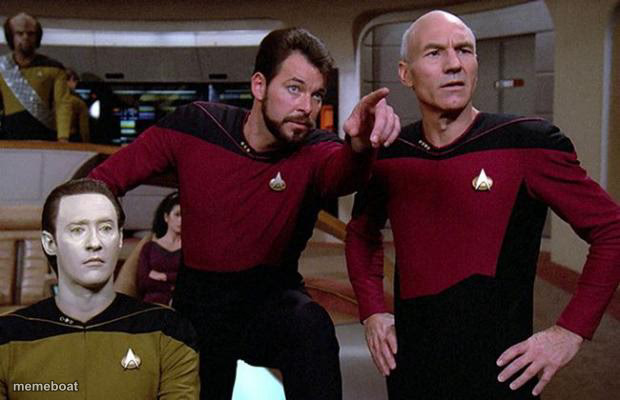
Riker pointing dramatically with Data and Picard beside him on the Enterprise bridge. Great for 'look at this' reaction memes. Free caption tool.
Blank Riker Pointing meme template
Download the blank Riker Pointing template to caption it yourself, or add your text right here in the editor above and download the finished meme.
When to use the Riker Pointing meme
- Spotting the one typo in a 40-slide deck
- Pointing out who left dishes in the office sink
- 'Look at this graph' during a budget meeting
- Calling out the obvious plot hole in a movie
Riker Pointing template facts
- Featuring
- Commander William Riker (Star Trek: The Next Generation)
- Dimensions
- 620 × 400 px
- Format
- JPG
- Text boxes
- 1
- Added
- 2025
About the Riker Pointing meme template
Riker jabs a finger at something off-screen while Picard and Data look unbothered, like he just spotted the one thing that's about to ruin everyone's day. Classic 'behold' energy from the bridge of the Enterprise.
Popular Riker Pointing caption ideas
When you spot the last slice of pizza someone hid in the fridge
Me pointing out the one bug in 10,000 lines of code
That guy who reply-alls to the whole company
Templates similar to Riker Pointing

Riker Pointing meme FAQ
How do I make a Riker Pointing meme?
Scroll up to the Riker Pointing template, type your caption into the text box in the editor above, adjust the font, size and color if you like, then click download. Your finished Riker Pointing meme is ready to share in seconds.
Can I use the Riker Pointing template for free?
Yes. The Riker Pointing template is completely free to use — no signup and no limits on how many memes you create or where you share them.
How do I download my Riker Pointing meme?
Click the download button under the editor once your Riker Pointing meme looks right. It saves straight to your device as a high-quality PNG or JPEG image.
How do I download the blank Riker Pointing template?
Use the "Download blank template" button in the blank Riker Pointing template section above to save the original, un-captioned image — handy if you'd rather caption it in another app or keep a copy.